9 Best Directory Website Builders in 2026
Hosted builders, WordPress plugins and themes, compared for someone starting a local-business directory: setup work, year-one cost, how each one earns and what you keep if you leave.

The first choice is the type, not the brand. A hosted builder runs the site for a monthly fee. A WordPress plugin or theme costs less up front, but hosting, updates and security become your job. LocusPilot is our product and sits first; every scorecard mark comes from the vendors' own pages, checked on 25 October 2026, including the two criteria where we score no.
Quick picks:
- A local-business directory that fills itself and is built to capture leadsLocusPilot
- Members pay dues or profile fees on the siteBrilliant Directories
- A free start on WordPressDirectorist
- The smallest hosted testDirectify
What matters when you start a local-business directory
Six things decide whether a first directory earns or stalls. One WordPress builder put the cost of the do-it-yourself route plainly on Reddit: "I've got four months into my site so far and I'm still learning." These six are the scorecard columns further down.
- Fills with real businessesAn empty directory gets no traffic. The tool should load real local businesses, not wait for owners to sign up.
- No WordPress upkeepPlugins are cheap until you count hosting, updates and security patches, which become yours.
- Writes the contentA listing with only a name and a phone number looks like every other directory, to Google and to AI answers.
- Captures leadsQuote and contact forms on listings are how you prove value to the businesses you will later charge.
- Takes payments on sitePaid listings, featured slots and memberships billed by the site itself, not invoiced by you.
- Export or self-hostWhether you can take your listings out as a file or run the site yourself, if you leave or the vendor changes its prices.
Quick comparison: best directory website builders
| Product | Type | Best for | Starting price | What's different | Review |
|---|---|---|---|---|---|
| LocusPilot | Hosted | Local-business directories | $29/mo | Writes review analysis and guides | Read → |
| Brilliant Directories | Hosted | Paid-membership directories | $97/mo | Bills members on the site | Read → |
| eDirectory | Hosted or self-hosted | Self-hosting with source code | $99/mo | Cloud, or a $1,499 PHP licence | Read → |
| Listeo | WordPress theme | Booking directories | $89 once | Bookings and commissions built in | Read → |
| HivePress | WordPress plugin | WordPress marketplaces | Free · $99/yr | Paid listings in the free core | Read → |
| GeoDirectory | WordPress plugin | Multi-city on WordPress | Free · $139/yr | Country to neighbourhood levels | Read → |
| Directorist | WordPress plugin | Free WordPress start | Free · $129/yr | Unlimited listings free | Read → |
| Softr | App builder | Directories behind a login | Free · $25/mo | Runs on Airtable or Sheets data | Read → |
| Directify | Hosted | Cheap hosted tests | Free · $12/mo | Maps import with reviews | Read → |
USD, from each vendor's pricing page on 25 October 2026. "Free" is the free core or plan; the second price is the first paid plan.
1. LocusPilot Directory Builder
HostedLocusPilot Directory Builder builds a local-business directory from a short form: pick one of 4,274 Google Business categories and a city, then your brand and design. The engine pulls the businesses, reads their recent reviews and writes the review analysis, rankings, best-of pages and buyer guides. There is nothing to install and no plugin to keep updated.
It is built for operators who earn from leads and featured slots. Every listing has a quote form, and calls, WhatsApp taps and website clicks are tracked. The Operator plan is $29 a month with two directories and 30 credits; a 100-listing build costs 15 credits, a monthly refresh 5, and your first build costs none.
- Review analysis on every listing: praise themes, watch-outs, who it suits
- Ranked on a published method (live example), with review sentiment weighted 28% by default
- Closed businesses and dead websites removed each refresh, with a "last verified" date
- One directory covers up to 15 cities in one state
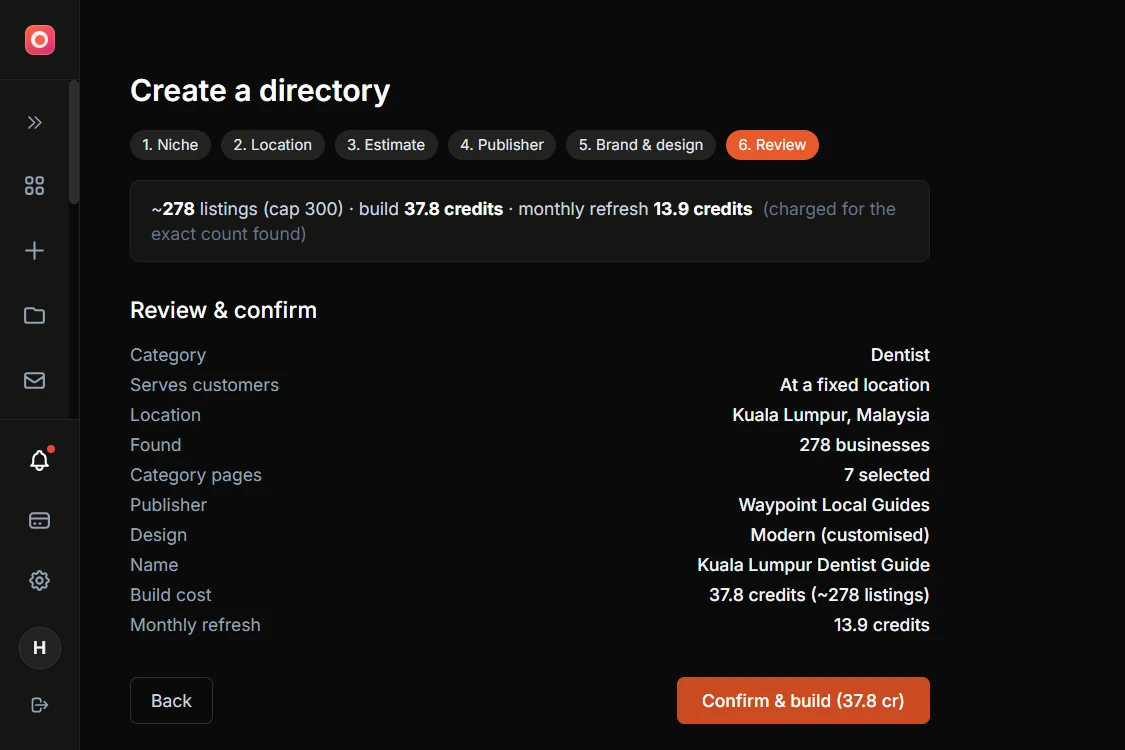
Not for: payments or member dues on the site, more than 1,000 listings per directory, languages other than English, or running the code on your own server. The directory cannot be exported and is suspended if the subscription ends. There are no refunds; the first build costs no credits. To see the output before paying, browse the Puchong Cafe demo.
What LocusPilot directories look like in use
Just built my first directory. Looks great and was easy to get going.
AAustin D., LocusPilot customer
- A cafe directory LocusPilot runs had 5,230 Search Console clicks and an average position of 7.4 between 5 July and 24 October 2026. That is one site, not a forecast for yours.
- Puchong Cafe, a live demo with 200 listings, cost about 25 credits to build.
- AI crawlers allowed on every directory, with schema and llms.txt.
LocusPilot vs a WordPress directory plugin
| Feature | LocusPilot | WordPress plugin + theme + hosting |
|---|---|---|
| Setup | Short form, nothing to installwins | WordPress, a theme, the plugin, add-ons |
| Listings | Pulled from Google Business categorieswins | CSV, or Google Places with your own API key |
| Content | Review analysis and guides writtenwins | You write it |
| Upkeep | Hosting and updates includedwins | Updates and security patches are yours |
| Payments on site | None; you invoice featured slots | Paid listings, claims, membershipswins |
| If you leave | Directory cannot be exported | Your files and databasewins |
| Year one | $348 | Free core + hosting; $99-$139 for all add-onswins |
A plugin is cheaper and yours to keep. LocusPilot does the data, the writing and the hosting. If members will pay you through the site, a plugin or Brilliant Directories fits better.
2. Brilliant Directories
HostedBrilliant Directories is a hosted platform for membership-style directories: members pay for profiles, and the site bills them and handles renewals. The monthly plan is $97 with 100 business records loaded for you. A $997 lifetime plan is still listed, under a notice that lifetime plans are going away.
It suits owners who want the site to collect the money. Stripe, PayPal and Authorize.net, coupons, free trials and up to 100,000 members are in the base plan, and one Reddit user summed it up as "Member profiles that don't suck. Subscription management that works." Its add-on page lists 70 premium add-ons, sold together for $95 a month, and a few of them (coupons, free trials, member export) also appear as included on the pricing page. AI crawlers are blocked on the free hosting tier unless you add the $15-a-month Enhanced Hosting Bundle.
Strengths
- Recurring payments, coupons and trials in the base plan
- 100 business records loaded on the monthly plan
- White-labelled, no "powered by" branding
- 7-day free trial, no card
Watch out for
- Premium add-ons sold as a $95/mo bundle
- AI crawlers blocked unless you pay $15/mo
- One site per plan
Pick Brilliant Directories if members will pay you through the site.
3. eDirectory
Hosted or self-hostedeDirectory sells directory software as a cloud service from $99 a month, or as a $1,499 PHP source licence you run on your own server. Every plan includes payment processing, unlimited listings and members and a lead-gen form, and you can start on the cloud and move to the licence later. The $99 plan carries eDirectory branding; the unbranded Enterprise Cloud plan is $199 a month.
It suits owners who want a guided start. There is no self-serve trial: you book a demo, and an optional setup service costs $497 or $796. Terms auto-renew with 30 days' notice and refunds close 48 hours after purchase, so read the order before you sign. The AI features run on your own OpenAI key.
Strengths
- Payment processing on every plan
- Unlimited listings and members
- Start on the cloud, move to self-hosted later
- Built-in CSV import and export of listings
Watch out for
- No self-serve trial; you book a demo
- 48-hour refund window
- Plugins cost $97-$299 each
Pick eDirectory if you want to run the directory on your own server with source code access, or want a vendor to set it up with you.
4. Listeo
WordPress themeListeo is a WordPress directory and booking theme by Purethemes, sold as a one-time licence: $89 for one site, $149 for three and $449 for ten, with 12 months of support. Bookings with time slots, tickets and availability calendars are built in, and the theme takes a commission on each booking through WooCommerce.
It suits directories where the visitor books, such as rentals, tours or appointments. Visitors can also message a listing owner in real time, and owners can switch on a contact form that emails them. A free importer pulls places from Google with your own Places API key. Buy on purethemes.net: the vendor says the ThemeForest licence is a limited package.
Strengths
- Bookings, tickets and commissions built in
- One-time licence, no yearly fee
- Vendor demo runs 20,000 listings
- Nine plugins included, MCP among them
Watch out for
- Support renews at $59/yr after 12 months
- Google import needs your own API key
- ThemeForest version is a limited package
Pick Listeo if visitors will book or reserve through your directory.
5. HivePress
WordPress pluginHivePress is a free WordPress plugin for directories and marketplaces, extended by add-ons and themes. The free core already charges for listings, featured spots and claims through WooCommerce, and free add-ons cover reviews and private messages between users and listing owners.
It suits WordPress builders making a rentals, services or jobs marketplace from a ready theme such as RentalHive or ExpertHive ($89 each). Every extension and theme comes in a $99-a-year bundle, or $199 a year for unlimited sites. CSV import and schema controls are $29 add-ons, and reviewers say changes beyond the default templates need CSS or PHP.
Strengths
- Paid, featured and claimed listings in the free core
- All extensions and themes for $99/yr
- 4.9 stars from 221 WordPress.org reviews (October 2026)
- 30-day money-back guarantee
Watch out for
- Hosting, updates and security are yours
- No Google Maps import named
- Reviewers say custom layouts need CSS or PHP
Pick HivePress if you are building a marketplace on WordPress and can handle some CSS.
6. GeoDirectory
WordPress pluginGeoDirectory is a WordPress business directory plugin by AyeCode, free on WordPress.org with more than 10,000 active installs. The core covers listing submission with a form builder, CSV import and export, ratings and reviews, and contact forms through the free Ninja Forms plugin.
Its strength is scale across places: the Location Manager add-on ($49) adds country, region, city and neighbourhood levels, and the free core is limited to one city without it. Paid listings need the Pricing Manager add-on ($49 for one site). A $139 one-year membership covers every add-on and theme for one site, and the plugins keep working if you stop renewing. You supply the hosting.
Strengths
- Location Manager for country to neighbourhood levels
- 4.8 stars from 716 WordPress.org reviews (October 2026)
- Every add-on and theme for $139/yr, one site
- Free Events add-on
Watch out for
- One city in the free core
- Paid listings and claims are add-ons
- No AI writing named on vendor pages
Pick GeoDirectory if you want several cities on one WordPress site.
7. Directorist
WordPress pluginDirectorist is a WordPress directory plugin by wpWax. The free core on WordPress.org has unlimited listings, custom fields, several directory types on one site and CSV import, and its new AI setup builds the directory structure and fields from a prompt. One owner wrote that they "manage over 19,000 listings" with it without major performance issues.
Money features sit in the paid plans: payments, paid listings, claims and pay-per-lead. The Starter plan lists at $129 a year for one site, with lifetime licences from $379. A Google Maps importer pulls up to 60 listings per run with your own Places API key. Hosting, updates and security stay with you.
Strengths
- Unlimited listings in the free core
- Several directory types on one site
- AI setup builds structure and fields from a prompt
- Lifetime licence from $379
Watch out for
- Payments and paid listings need a paid plan
- Google import needs your own billing and key
- AI sets up fields, not listing content
Pick Directorist if you want to test a WordPress directory for free first.
8. Softr
App builderSoftr is a hosted app builder for business tools and portals. A directory is one of its templates, built on Softr Databases or on data you already keep in Airtable, Google Sheets or Notion, with logins and permissions included.
It suits member, partner or internal directories behind a login more than public local-business ones. A custom domain needs the Basic plan at $25 a month, and removing Softr branding needs Pro at $119 a month. It can charge through its Stripe integration (paid sign-ups, checkout forms), but the pages we checked name no paid listings, claim listings or Google Maps import. Listings kept in Airtable or Sheets stay there; Softr Databases document imports, not a full export.
Strengths
- Reads Airtable, Google Sheets and 15+ other sources
- Logins and permissions built in
- Free plan up to 1,000 records per database
- 50% off for non-profits
Watch out for
- Branding removal needs Pro, $119/mo
- No paid listings or claims named
- No full export from Softr Databases yet
Pick Softr if your listings already live in Airtable or Sheets and sit behind a login.
9. Directify
HostedDirectify is a hosted no-code directory builder with a free plan for one directory and 10 listings. Paid plans start at $12 a month for 50 listings, and Google Maps import brings each business with its newest reviews, from credit packs (from $9 per 100 listings) or your own Google key.
Most money features wait for the Pro plan at $39 a month: payments to your own Stripe with 0% platform fees, lead forms and unlimited listings. A second directory and the AI content generator need Growth at $69, and yearly billing gives two months free. Directify's founder said in a June 2026 Reddit post that the product was sold in February 2026.
Strengths
- Free plan for a first test
- Maps import with reviews
- 0% platform fees on payments
- MCP server for Claude and other AI clients
Watch out for
- Payments and leads from Pro, $39/mo
- One directory until Growth, $69/mo
- AI content generator from Growth
Pick Directify if you want to test a niche on the smallest hosted budget.
Scorecard: nine builders, six criteria
Read across for one tool, or down a column for the criterion you care about most.
Scroll sideways for every criterion →
| Tool | Fills with real businesses | No WordPress upkeep | Writes the content | Captures leads | Takes payments on site | Export or self-host |
|---|---|---|---|---|---|---|
| LocusPilotHosted | YesPulls Google Business listings | YesHosting included | YesReview analysis and guides | YesQuote form on every listing | NoYou invoice featured slots | NoCannot export or self-host |
| Brilliant DirectoriesHosted | Yes100 business records included | YesAI crawlers $15/mo extra | YesAI page generator, 30 credits/mo | YesLead matching is an add-on | YesStripe, PayPal, Authorize.net | PartialBackup; vendor pages conflict on member export |
| eDirectoryHosted or self-hosted | PartialCSV import; done-for-you import costs extra | YesCloud plans hosted | PartialAI needs your OpenAI key | YesLead-gen form | YesOn every plan | YesListing export; $1,499 self-host licence |
| ListeoWordPress theme | PartialGoogle Places, your API key | NoYou host and update it | PartialAI descriptions need pro importer, OpenAI key | YesOwner messages and contact form | YesWooCommerce, booking fees | YesYou own the install |
| HivePressWordPress plugin | PartialCSV import add-on, $29 | NoYou host and update it | NoNo content writing | PartialMessages, no contact form | YesFree core, via WooCommerce | YesYou own the install |
| GeoDirectoryWordPress plugin | PartialCSV; Google listings one at a time | NoYou host and update it | NoNo AI writing named | YesContact forms via Ninja Forms | PartialPricing Manager add-on, $49 | YesYou own the install |
| DirectoristWordPress plugin | PartialGoogle Maps import, your API key | NoYou host and update it | NoAI sets up fields, not content | YesOwner contact form in core | PartialPaid plans, from $129/yr | YesYou own the install |
| SoftrApp builder | PartialCSV, Airtable or Sheets | YesCustom domain from $25/mo | NoBuilds the app, not listings | YesForms included | PartialStripe via workflows; no paid listings | PartialStays in Airtable or Sheets |
| DirectifyHosted | PartialMaps packs from $9 per 100 | YesHosting and SSL included | PartialAI content generator from Growth, $69 | PartialFrom Pro, $39/mo | PartialFrom Pro, 0% platform fee | PartialCSV export; options vary by plan |
Yes = included at the price in the From column. Partial = covers only part of the criterion, or needs a higher plan, a paid add-on or your own API key. No = not offered, or not found on the vendor's pages. Read from vendor pages on 25 October 2026.
What a working directory costs in year one
Year one is the cheapest plan that runs a public directory on your own domain and takes money or captures leads, billed yearly where the vendor offers it.
| Tool | Year one | How we got it |
|---|---|---|
| LocusPilot | $348 | $29 × 12; first build free, and a 100-listing directory refreshes monthly on included credits (1,000 listings need 50 credits a month, above Operator's 30) |
| Brilliant Directories | $1,164 | $97 × 12; the $997 one-time lifetime plan while it is listed; $1,344 with AI crawlers allowed |
| eDirectory | $891 | $74.25 × 12 billed yearly; $1,188 billed monthly |
| Listeo | $89 + hosting | One-time; support renews at $59/yr |
| HivePress | $0 + hosting | Free core; $99 for every add-on and theme |
| GeoDirectory | $49 + hosting | Pricing Manager for paid listings; $139 for all add-ons |
| Directorist | $129 + hosting | Starter list price, 1 site |
| Softr | $228 | Basic billed yearly, the first plan with a custom domain ($300 billed monthly); $1,188/yr to remove Softr branding |
| Directify | $396 | Pro billed yearly ($468 billed monthly), needed for payments and leads |
WordPress hosting varies with the host and the traffic, so we show it as "+ hosting" rather than guess.
Not on this list
AI answers name these three as well. We listed tools that ship directory features or a vendor-made directory template; these leave the directory to you, to third-party add-ons or to community templates.
Webflow
Named by Gemini, 3 of 3 runsA website builder with a CMS (20,000 items on the $39-a-month Premium plan). Visitor search filters and listing sync come from add-on tools such as Jetboost or Whalesync, so you assemble the directory yourself.
Look at instead: Directify for a hosted builder with directory features.
Bubble
Named by Perplexity, 3 of 3 runsA general app builder. You design the database, the search and the listing pages yourself, or start from a community template: right for custom logic, slow for a first directory.
Look at instead: Softr, an app builder with directory templates.
Airtable
Named by Gemini, 3 of 3 runsA database, not a website. It needs a front end to become a public directory.
Look at instead: Softr (#8), which reads Airtable directly.
How to choose a directory builder
Five questions, in the order they rule tools out. The directory setup guide shows what the LocusPilot route looks like step by step.
- Decide how it earns: leads and featured slots, paid listings, or member dues. Dues point to Brilliant Directories or a plugin with memberships.
- Count listings and cities. Several cities need GeoDirectory's Location Manager or a multi-city plan.
- Decide who keeps it running. If nobody wants WordPress updates, stay hosted.
- Price year one, not month one: hosting, add-ons and the plan you need for payments.
- Check the exit: can you take the listings, and the site, if you leave?
Frequently asked questions
What is the cheapest way to build a directory website?
Should a first directory be hosted or on WordPress?
Can a directory fill itself with real businesses?
Which directory builders take payments for listings?
Can I move my directory to another builder later?
Can I run several directories on one plan?
Which directory builder is right for you?
- Local-business directory earning from leads and featured slots: LocusPilot
- Members pay dues on the site: Brilliant Directories
- Free start on WordPress: Directorist, or GeoDirectory for several cities
- Bookings or rentals: Listeo or HivePress
- Smallest hosted test: Directify