Add locations to a directory
A directory usually starts in one city. When it is working, the natural next move is the city next door. Add locations expands a live directory into more cities without rebuilding anything: the new listings, city sections, and pages arrive in one operation while everything you already have stays put.
This guide covers how the add works, what it costs (including the automatic refund), when to give the site a region identity instead of a city identity, and what happens to your URLs when the site restructures. If you have not built a directory yet, start with How to create a directory website. For day-to-day operations, see How to manage your directory.
1How a location add works
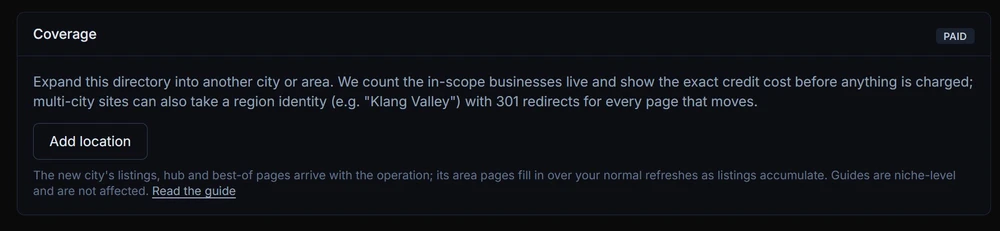
Open your directory, go to the Publish tab, and hit Add location. The flow has three moments.
Check (free)
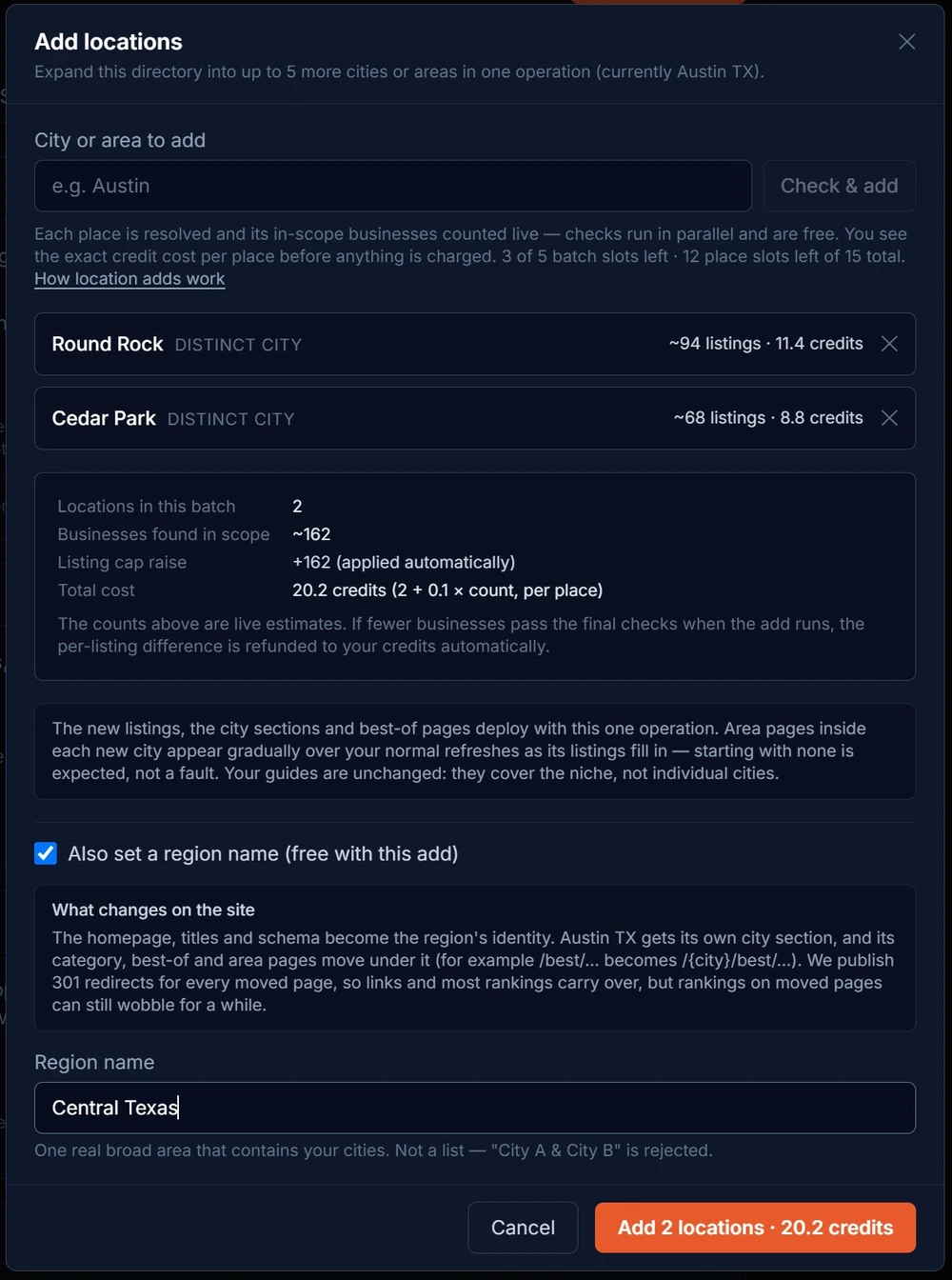
Type a city and we resolve it, classify it as a distinct city or a neighbourhood of a city you already cover, and run a live count of the businesses in scope there. Checks take 30 to 90 seconds and cost nothing. You can queue up to 5 cities and the checks run side by side.
Confirm
Each city shows its business count and its exact credit cost. The confirm button stays locked until every check finishes, so the total you approve is the total we charge. Close the window instead and nothing is charged; checks are free to abandon.
The add runs in the background
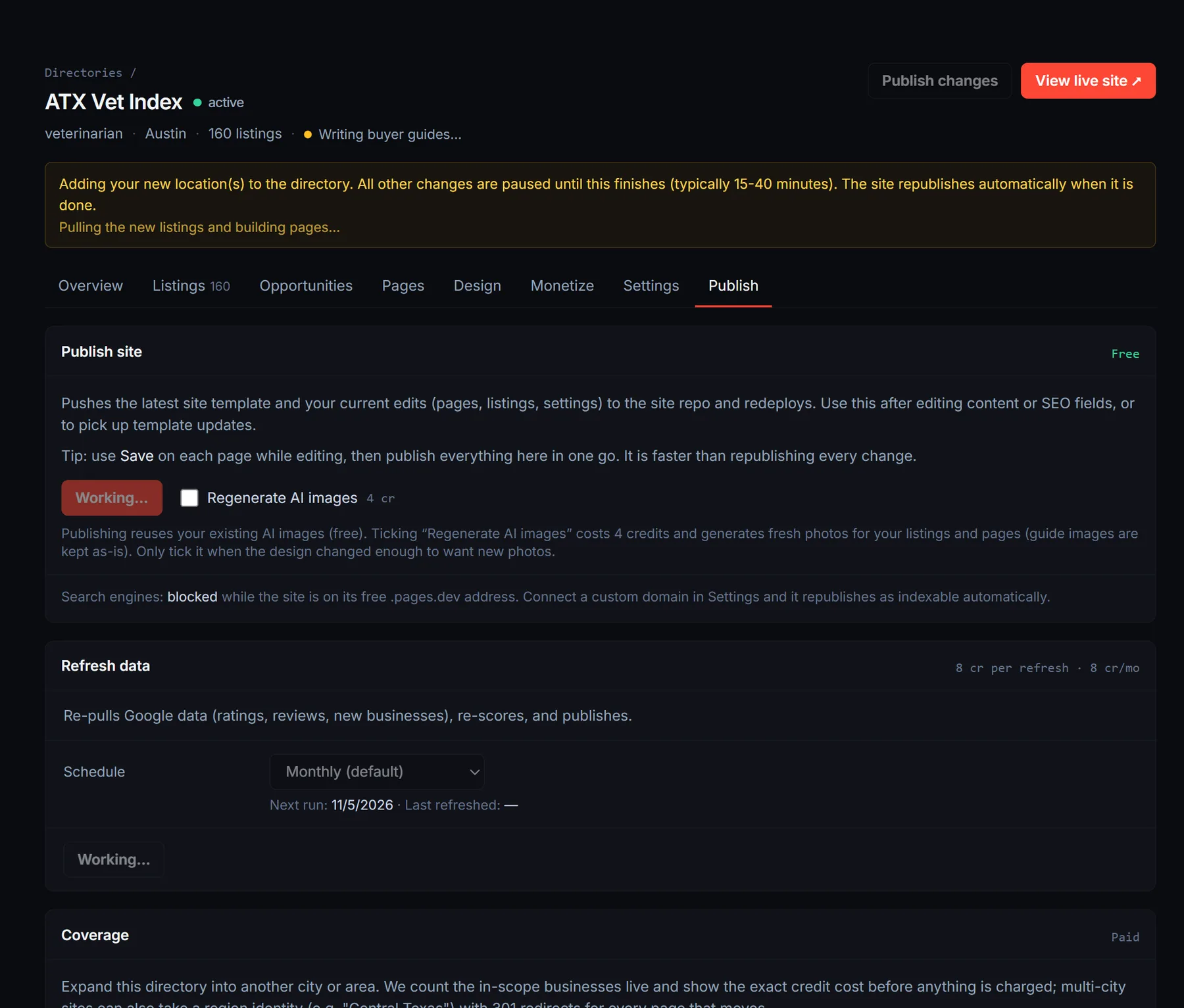
One background job pulls the new cities’ listings, builds their city sections and pages, writes city-specific editorial, and republishes the site. It typically takes 15 to 40 minutes. While it runs, the dashboard pauses other changes so nothing collides with it, and it unlocks itself when the job finishes.
A directory covers up to 15 places in total. You can add up to 5 in one batch, so a large state build-out is two or three batches. Covering more than one state? Build a second directory instead; one site per state is the structure that ranks.
If you already know you want more than one city, build with at least two from the start. A one-city directory keeps its neighbourhood and best-of pages at the top level, and going from one city to several later rebuilds those URLs underneath city sections. Launch with two and the structure is settled, so every city you add after that only adds pages.
One number to watch either way: the maximum-listings ceiling you choose at build time is shared across every city in that build, so four cities split one number four ways. A city you add later raises that ceiling by its own live count instead of taking a share of the cities already there.
2What it costs, and the automatic refund
Each city costs 2 credits plus 0.1 credits per estimated listing. A city that checks at 80 businesses is 10 credits. Add three cities in one batch and the three costs are summed into a single charge, which you see in full before confirming.
The estimate protects you, not us. The live check counts every business it can find in scope, but the final admission rules are stricter: a business must actually belong to the city, pass quality checks, and not already be on your site. When fewer listings land than the check estimated, the per-listing difference is refunded to your credits automatically as part of the same job. You pay for what actually arrived.
The new listings also raise your refresh footprint: data refreshes cost 0.05 credits per listing per cycle, so a directory that grows from 100 to 250 listings goes from 5 to 12.5 credits per refresh. The Publish tab always shows your current per-cycle cost.
3Cities vs a region name
A single-city directory carries that city’s identity everywhere: the homepage, the titles, the structured data. Add a second or third city and a question appears that did not exist before: whose name is on the front door?
Keep the original city’s identity
The default. The homepage stays “Austin” while Round Rock and Cedar Park get their own city sections underneath. This works while the original city still holds most of the listings. As the new cities fill in, the mismatch grows: the homepage says Austin but half the businesses are not in Austin, and the ranking rules gradually retire the root best-of pages because they no longer represent the whole site.
Set a region name
Give the site one broad, real area name that contains all its cities: Central Texas, Tampa Bay, the Research Triangle. The homepage, titles, and schema become the region’s identity, every city (including the original) gets an equal city section, and the original city’s pages move intact into its own section with 301 redirects. The name must be a real area a local would recognise; made-up labels and “City A & City B” lists are rejected, because a region page that is really two city pages stapled together competes with itself.
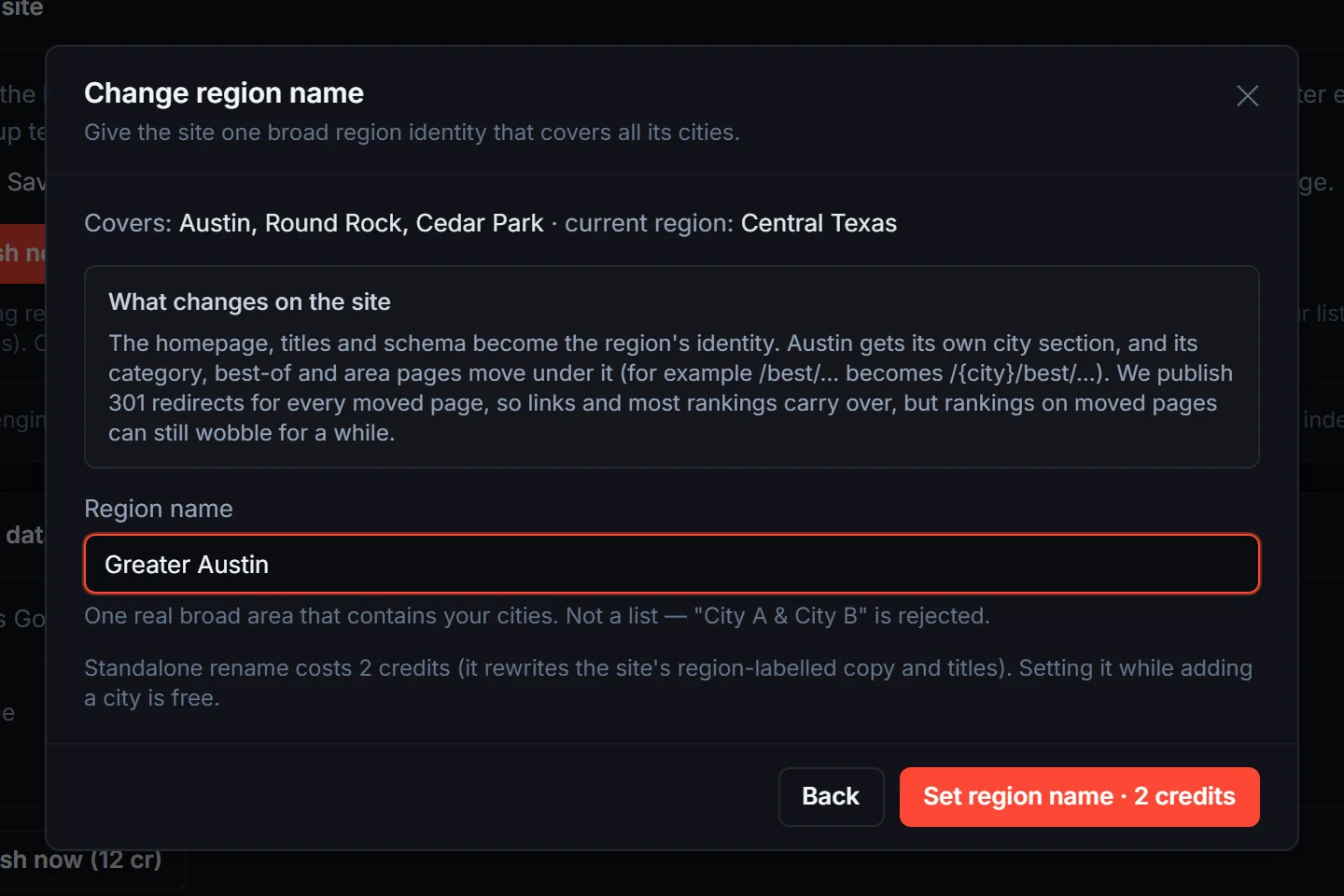
The wizard does the arithmetic for you: when an add would leave your original city holding under half of the site’s listings, it recommends setting a region name in the same operation. Setting one during an add is free. Doing it later as its own operation costs 2 credits, because it rewrites the site’s region-labelled copy and titles. On a site that is live on its own domain, you retype the name to confirm, since real URLs move.
4What happens to your URLs
Adding a city on its own does not move any existing page; it only adds new ones. The restructure happens when a region name takes over from a city identity: the former primary city’s root-level pages (its best-of lists, its area pages) relocate under its own city section, for example /best/emergency-plumbers/ becomes /austin/best/emergency-plumbers/.
Every moved page gets a 301
The rename publishes a permanent redirect from each old address to its new one, so existing links, bookmarks, and search results keep working. The redirects ship with the site and stay in place across every future publish and refresh; they are not a one-off patch.
Rankings mostly carry over
A 301 passes the page’s standing to the new address, which is why this is safe to do on a ranking site. Expect some movement anyway: pages that change address can wobble in search for a few weeks before settling. That is normal, and it is the reason to set the region name early rather than after the old URLs have years of equity.
Nothing else moves
Listing pages, guides, category hubs for the region, and every page that was not tied to the former primary city keep their addresses.
5What to expect after the add
The city section appears with the add
A new city that clears a small minimum of listings gets its own hub page, category pages, and best-of lists in the same operation, written for that city specifically.
Area pages fill in over time
Neighbourhood-level pages inside the new city appear gradually over your normal refresh cycles as its listings accumulate. A new city starting with no area pages is expected, not a fault.
Your existing cities can gain neighbourhoods too
If a city you already had was carrying a short town list (common on directories built before the current neighbourhood system), the add upgrades it to the full set in the same operation. A noticeably longer Towns menu after an add is this, working as intended.
Your guides do not change
Buyer guides and blog articles cover the niche, not individual cities, so an add never rewrites them.
Your edits survive
Pinned listings, edited pages, SEO overrides, and hidden listings all carry through, the same as on a refresh.
Frequently asked questions
The check estimated 100 businesses but far fewer landed. Did I overpay?
No, and this gap is normal. The check counts every business it can find serving the new city. Final admission is stricter: the business must actually belong to that city, pass quality checks, and not already be on your site. That last rule is the big one. In service niches (landscapers, plumbers, cleaners), many companies serving the new city are businesses you already list; they count in the check, then fold into your existing listings when the add runs instead of being added twice.
Whatever the gap turns out to be, the per-listing difference refunds to your credits automatically when the add completes. The refund shows in your credit history with the admitted and estimated counts per city, so you can see exactly what you paid for. In practice you pay the flat fee per city plus 0.1 credits per listing that actually landed.
After the add, my Towns menu gained a lot of neighbourhoods. Where did they come from?
Two places, both intentional. First, each new city brings its own set of districts and commercial areas as coverage candidates. Second, the operation checks the cities you already had: older directories carry a short town list, and the add upgrades any thin list to the full neighbourhood set (15 to 25 areas per city). These are areas inside your cities, not extra cities; each one can earn a neighbourhood page that captures searches like “landscaper in Zilker”, and they fill with listings over your normal refreshes.
I typed a suburb and it was classified as a neighbourhood, not a city. What does that mean?
Some places are genuinely part of a city you already cover. Those fold in as an area page inside the existing city section instead of getting their own hub, which is the honest structure: a “city” page for a neighbourhood with six businesses ranks worse than a strong area page inside a real city. The check tells you the classification before you pay.
When should I set the region name?
The moment your original city stops being the clear majority of the site, and ideally in the same operation as the add that causes it (the wizard flags exactly this). Doing it early means the moved pages carry less history and settle faster. Setting it during an add is free; standalone later is 2 credits.
Will the restructure hurt my rankings?
Every moved page gets a permanent 301 redirect that carries its standing to the new address, and the redirects persist across all future publishes. Expect some short-term movement on moved pages, then recovery. Pages that do not move are unaffected.
Why is my dashboard locked while the add runs?
The add rewrites the site’s scope, pulls data, and redeploys. Edits made mid-run could collide with that work, so the dashboard pauses changes and shows a progress banner. It unlocks on its own when the job finishes, typically inside 40 minutes.
What if the add fails?
If it fails before your site’s scope was changed, the whole charge refunds automatically. If it fails partway after the scope was updated, the charge stands and a retry finishes the expansion you paid for; nothing needs to be bought twice. Batches are all-or-nothing, so you never end up with two of three cities half-added.
Can I remove a city later?
There is no remove-a-city operation today, so treat each add as a commitment. You can hide individual listings at any time, but the city’s section and its refresh cost remain. If a city genuinely needs to come off a site, contact support.
My domain has the original city’s name in it. Is that a problem?
It keeps working, but a name like austinplumberpros.com reads narrower than a five-city site, and it will read narrower still under a region identity. The wizard warns you when it spots this. If the expansion is the long-term plan, a region-named domain from day one is the cleaner play; see the branding guide.
Should I add cities to one directory or build separate directories?
Cities in the same real region belong on one directory under one region identity. Different states, or cities with no shared identity a local would recognise, rank better as separate directories. The wizard also warns when an added city would stretch the site’s coverage past a plausible single region.
Expand when the first city works
Check a city for free, see the exact cost, and let the add run in the background. Your existing pages, edits, and rankings stay put.
The Add location button lives on your directory’s Publish tab.
Open your directories