Get Indexed - Push New Pages to Google
You publish 40 new pages. Two weeks later eight are in Google and the rest are nowhere. Nothing is broken. Google has not got round to them, and on a site with nothing linking to it, that wait can run for months.
Get Indexed shortens the wait. You pick the pages, we push them to Google through our indexing partner, and we tell Bing, Yandex, Seznam and Naver at the same time at no credit cost. Works on directories and on generated websites, from 0.04 credits a URL.
One thing to know before the detail: Get Indexed is a subscriber feature. It comes with any subscription, Operator upwards, and the credit rates are the same on every tier. Where the rest of this page says free, it means free of credits.
Read this before you spend anything. Submitting a URL asks Google to come and look at it. It does not make Google index it, and anyone who tells you otherwise is not being straight with you. What this tool removes is the waiting, not the judgement.
Get Indexed is opening to accounts in batches. If your dashboard says it is not available yet, you are in the queue rather than missing a setting.
1Why New Pages Sit There Doing Nothing
Google finds pages two ways: it follows links from pages it already crawls, and it reads your sitemap. A new site has almost nothing pointing at it, so the first route barely exists. The second works, but a sitemap is a suggestion with no deadline attached.
So a directory ships 600 listing pages and Google takes the homepage, a handful of categories, then loses interest for a month. Submitting a URL directly puts it in front of the crawler instead of waiting to be found. That is the whole idea, and it is worth understanding before you pay for it: you are buying attention, not a ranking.
2What Get Indexed Actually Does
One screen at Dashboard › Get Indexed, two things on it.
The paid half: Google
Your list goes to our indexing partner, who submits the URLs to Google and reports back per URL as they get picked up. This is the part that costs credits, and the only part that reaches Google.
The credit-free half: Bing, Yandex, Seznam, Naver
Those four run a shared protocol called IndexNow that takes a list of URLs and spends no credits. It has its own button beside the paid one, and it rides along with every paid submission at no extra cost. Google has never adopted IndexNow, which is exactly why the paid half exists.
3What It Costs
Who it is for: anyone on a subscription. The tool comes with every plan from Operator up, both halves of it, and the per-URL rates below do not change with the tier. Pay-as-you-go accounts can still read their past submissions but cannot send a new one.
Standard - 0.04 credits per URL
Starts within about 2 hours, then works through your list over the next day or two.
VIP - 0.16 credits per URL
Starts straight away. For pages you need looked at today.
A 25-page batch is 1 credit on standard, 4 on VIP. Use standard for everything except the pages that pay the bills.
Two things cut what you actually pay, both automatic:
- The pre-check is free. Before anything is charged we drop duplicates, invalid URLs, preview-domain URLs, pages marked noindex, and anything you sent in the last 30 days. You pay for what survives, and the screen tells you what it dropped and why.
- Failed URLs are refunded. If our partner cannot get a URL crawled, that URL's credits go back to your balance on their own. No ticket, no asking. You will see the refund on the submission and in your credit history.
The Submit button shows an estimate from the list on screen. The final charge is worked out after the pre-check, so it can come out lower. It never comes out higher.
4Sending Your First Batch
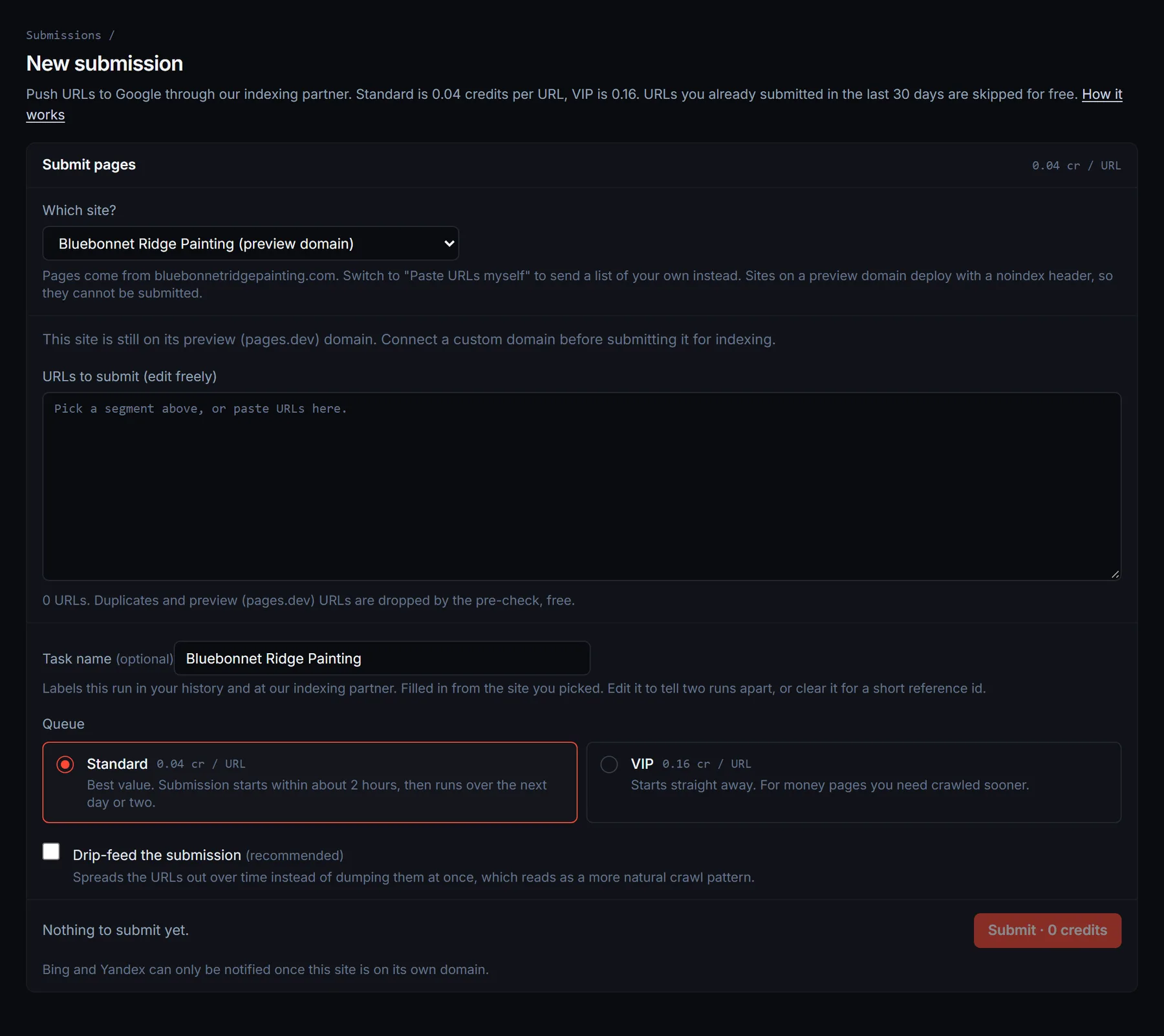
Open Dashboard › Get Indexed and press New submission. One batch, one screen.
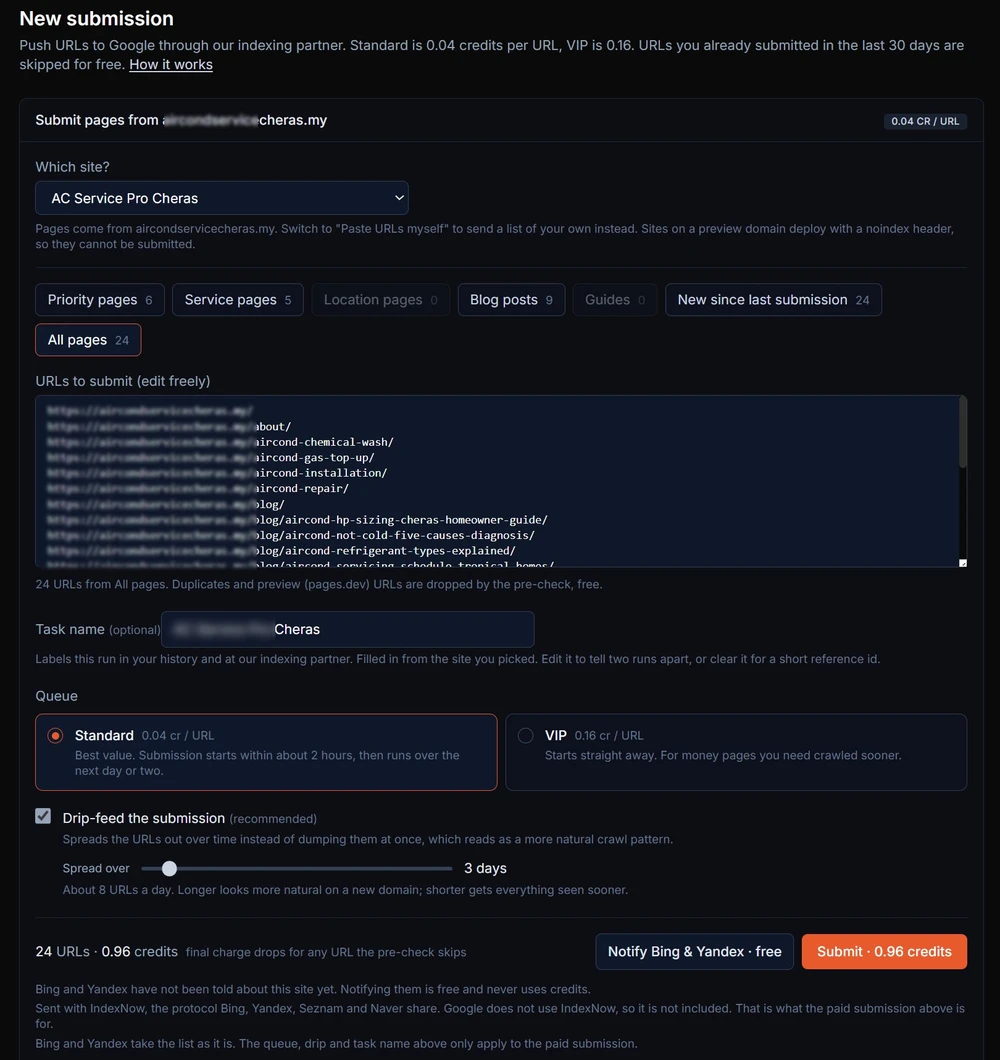
- 1Pick the site. Choose one of your directories or websites, or leave it on Paste URLs myself to send a list of your own.
- 2Pick a group of pages. The chips read your live site and count each group: on a directory, priority, category, area, guides and listings; on a website, priority, services, locations, blog, guides. Both have New since last submission, usually the one you want.
- 3Edit the list. The URLs land in a text box and stay editable. Delete the ones you do not want to pay for, paste one the crawl missed. What is in the box gets sent.
- 4Name it, if you like. Optional, and it only labels the run in your history. Blank gets a short reference id.
- 5Choose queue and drip, then submit. Both are explained below. The button shows what you are about to spend.
You can also arrive here already loaded. The Get Indexed panel on a directory, the card on a website's status screen, and the prompt after you publish new content all deep-link into this form with the right site and page group already selected.

5Standard, VIP and Drip-Feed
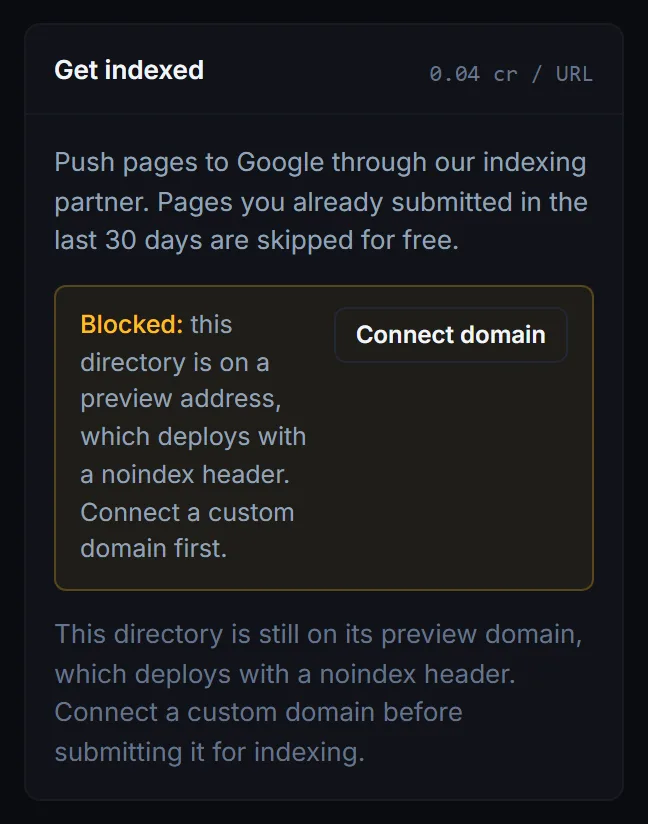
VIP skips the two-hour wait for four times the price. The pages that deserve it are the ones a customer would land on before buying. Everything else can wait two hours.
Drip-feed spreads the submission over 1 to 30 days instead of firing it all at once. It is on by default from 6 URLs up, and off below that because there is nothing to spread.
Why drip-feed is on by default
A brand-new domain submitting 400 URLs in one minute does not look like a site being discovered. It looks like a site being pushed. The same 400 spread over a week costs the same and reads like normal growth.
The slider shows the daily rate as you move it. Longer is safer on a new domain, shorter gets everything seen sooner. Above 100 URLs with drip switched off, the screen will say so.
On a big launch, pair them: VIP starts immediately, the drip sets the pace.
6Reading a Submission
Every batch gets a row in the submissions table with its status, what it cost, and what came back. Open a row for the detail: what you were charged, what was refunded, which queue it used, and the status of every URL in the batch.
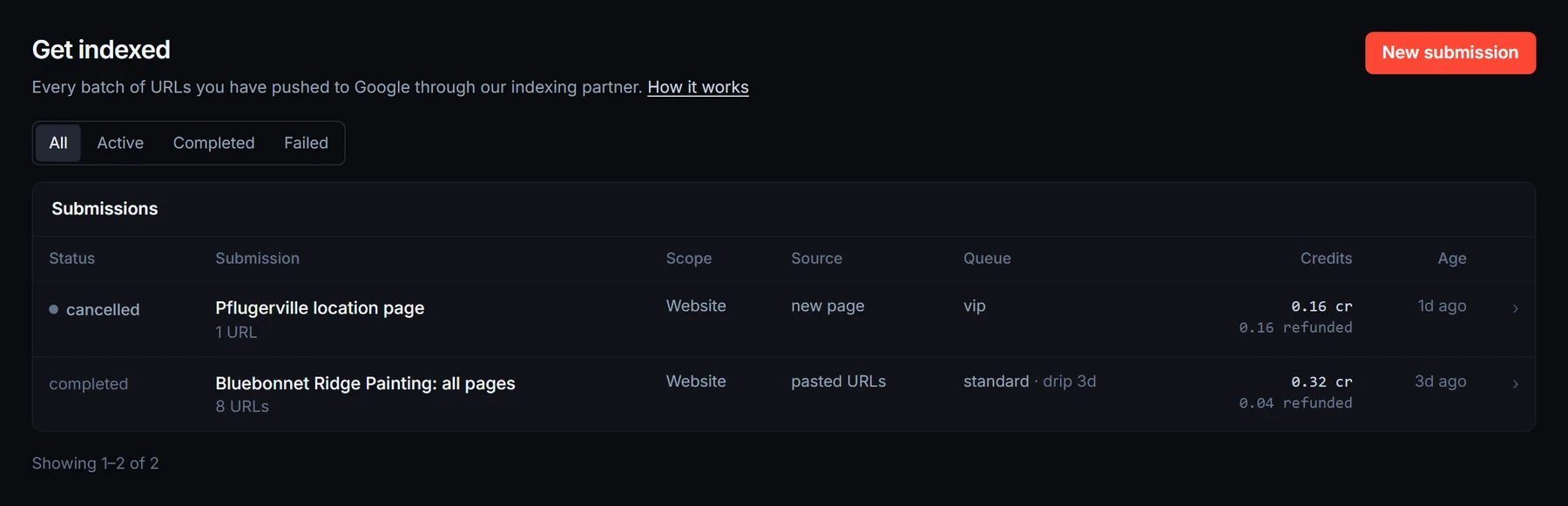
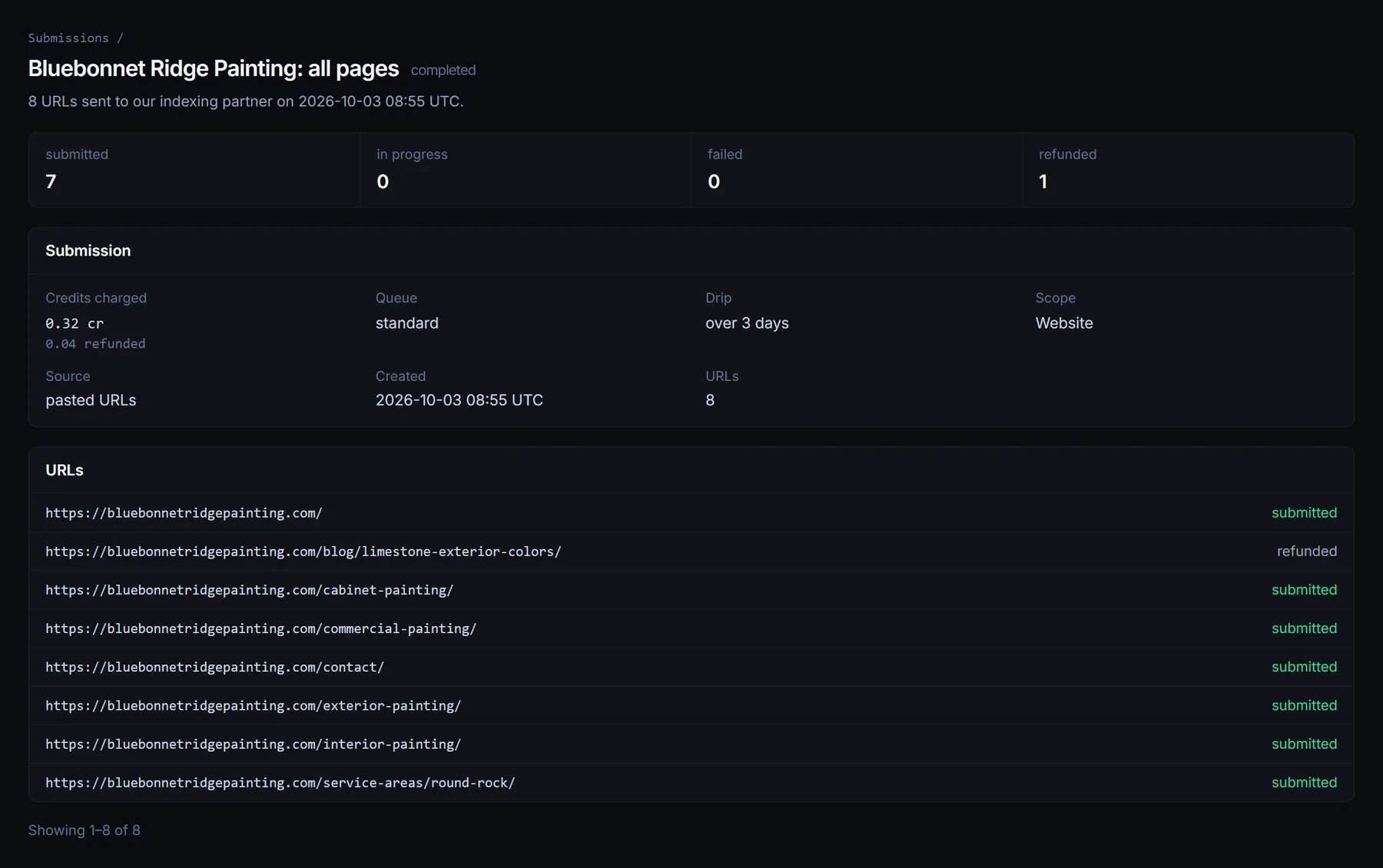
The screen updates itself while a batch runs. A submission still queued can be cancelled, which refunds it. Once our partner has started, it cannot.
Where these statuses come from. They are our indexing partner reporting on their own work: submitted, picked up, failed and refunded. That is a report about the submission, not a reading of Google's index.
The only place that answers “is my page in Google” is Google Search Console, or a site: search for the exact URL. Check there when you want the real answer.
7The Credit-Free Half: Bing, Yandex, Seznam and Naver
IndexNow is a shared protocol those four search engines run. You hand them a list of URLs, they come and look. It spends no credits, and it is one button on the same screen using the list you already curated. It also fires automatically alongside every paid submission, on the same URLs, at no extra cost.
Free here means free of credits, not free of subscription. This button sits inside Get Indexed, so it needs a subscription like the paid half does. What it never does is touch your balance, however often you press it.
Two things it needs first
- •A custom domain. A site still on its preview address ships with a noindex header, so there is nothing worth notifying anyone about.
- •One publish. These engines prove you own the site by fetching a small verification file from it. We add that file automatically, but it has to be live, which takes one publish. Until then the button says so.
There is a cooldown of roughly an hour per site, so the button will occasionally ask you to wait. Notifying the same engines about the same site six times in an afternoon does not help you.
One thing worth being blunt about: Google is not on this list. They announced a test of IndexNow years ago and never adopted it. Any tool telling you it notifies Google for free is telling you a story.
8Rules, Limits and What This Cannot Do
- •Your site needs a custom domain. Preview addresses deploy with a noindex header, so submitting them buys nothing. Connect a domain and the site becomes selectable.
- •A URL you sent in the last 30 days is skipped, free. It is already with our partner. Sending it again would charge you twice for one piece of work.
- •There is a daily cap per account. High enough that normal use never meets it, low enough to stop the paste box being pointed at somebody else's site by the tens of thousands.
- •Nothing indexes itself here. We never submit your pages automatically on a refresh or a rebuild. Every submission is a button you pressed, with the price on it. Once a page is doing fine, leaving it alone is the correct move.
And the honest limits:
- ✕It does not rank anything. Getting crawled is the entry requirement, not the prize. What you rank for is decided by the page.
- ✕It will not keep a thin page in the index. If Google decides a page is not worth keeping, paying to send it again will not change that answer. Fix the page.
- ✕It does not replace internal links. A page nothing on your site links to is a page Google will keep forgetting about, however many times you submit it. See internal linking.
9Questions We Get Asked
Will Google definitely index my page?
No, and be wary of anyone who says yes. You are paying to get the page looked at sooner. Whether it stays in the index is Google's call, based on the page.
How long does it take?
Standard starts within about two hours and works through the list over a day or two, longer if you drip-feed it. Bing and Yandex usually move within hours. Google moves when Google moves.
Can I submit a site that was not built here?
For the paid half, yes: paste any URLs you like. The credit-free half needs a site we manage, because the search engines verify ownership from a file published on the site itself.
Does this work for directories as well as websites?
Both, at the same prices, on the same screen. Only the groups of pages differ, because the two site types are built differently.
Do I need a subscription?
Yes, for both halves. Get Indexed comes with any subscription from Operator up, at the same per-URL rates on every tier, and the Bing and Yandex button sits inside it too. If a subscription lapses you keep your submissions screen: past batches, their statuses and any refund still on its way stay readable.
Related Guides
Got Pages Waiting?
Open Get Indexed, pick New since last submission, and see what you have been sitting on.
Open Get Indexed