Clone & Rebrand
You built a great website for one city. Now launch it as a completely new brand in a different town. New name, new team, new story, new content. Same proven design and layout, with optional visual style customization from a reference site.
The result is a fully independent website that looks, reads, and ranks like it was built from scratch by a local business in the target city.
1What Is Clone & Rebrand?
Clone & Rebrand takes a completed project and creates a standalone copy with a completely new business identity. Every page is rewritten with the new brand name, team credentials, local references, and SEO targeting. The result is a fully independent site that has no visible connection to the original.
eliteplumbinghouston.com (Elite Plumbing, Houston TX)quickfixplumbing.com.au (QuickFix Plumbing, Melbourne AU)Different brand name, different country, different team, different content. Same service structure and proven site architecture underneath.
2Clone & Rebrand vs Satellite Sites
LocusPilot offers two ways to expand from a completed project. Choose based on whether you want to keep your existing brand or create a new one.
| Satellite Site | Clone & Rebrand | |
|---|---|---|
| Brand | Same as parent | Completely new |
| Team & Story | Inherited from parent | New team, new story, new credentials |
| Content | Localized rewrites | Full identity rewrite + localized |
| Design | Same as parent | Same layout; visual style (colors, fonts, buttons, cards, spacing) customizable via sample HTML |
| Images | Only homepage images auto-generated; rest maintained from parent | Can regenerate all images across the site |
| Domain | Exact-match domain | Brand domain/Exact-match domain |
| Schema | parentOrganization linked to hub | Independent entity, no link |
| AI Site Agent | Not supported | Fully supported |
| Cost | 10 credits | 20 credits (+7 for premium images) |
| Best for | Ranking in more cities | New brand, new market, white-label |
Rule of thumb: If you want to rank the same brand in more cities, use Satellite Sites. If you need a different business identity, use Clone & Rebrand.
3When to Use Clone & Rebrand
New Market, New Identity
You run a roofing company in Melbourne. You want to expand to Sydney under a different brand so competitors don’t know it’s you. Clone your proven site, rebrand it as “Harbour City Roofing,” and launch with Sydney-specific content.
White-Label for Partners
A client or referral partner wants a website under their own brand. Clone your site, rebrand it with their business name, logo, and team details. Hand them a turnkey site in under an hour.
Segment Targeting
Run a premium brand for high-end clients and a budget-friendly brand for price-sensitive customers. Same services, different positioning and messaging. Each brand captures a different search intent.
Cross-Country Expansion
Australian business expanding to New Zealand. The system automatically adjusts currency, measurement units, regulations, and local terminology. Provide country-specific credentials in the business profile for best results.
4Step-by-Step: Create a Rebrand
Find the Clone & Rebrand button on any completed project’s status page. The 5-step wizard guides you through everything.
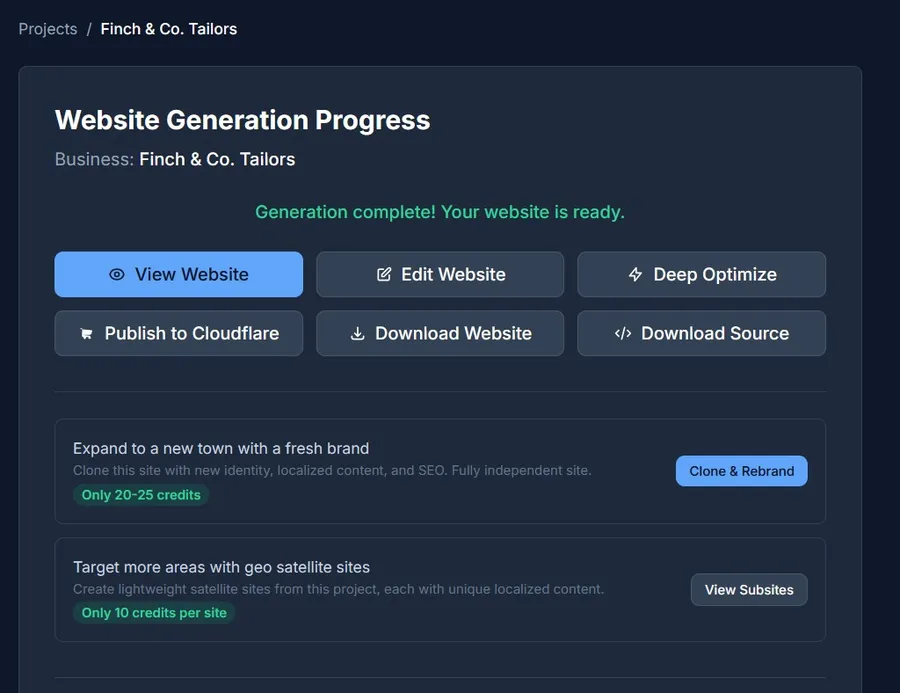
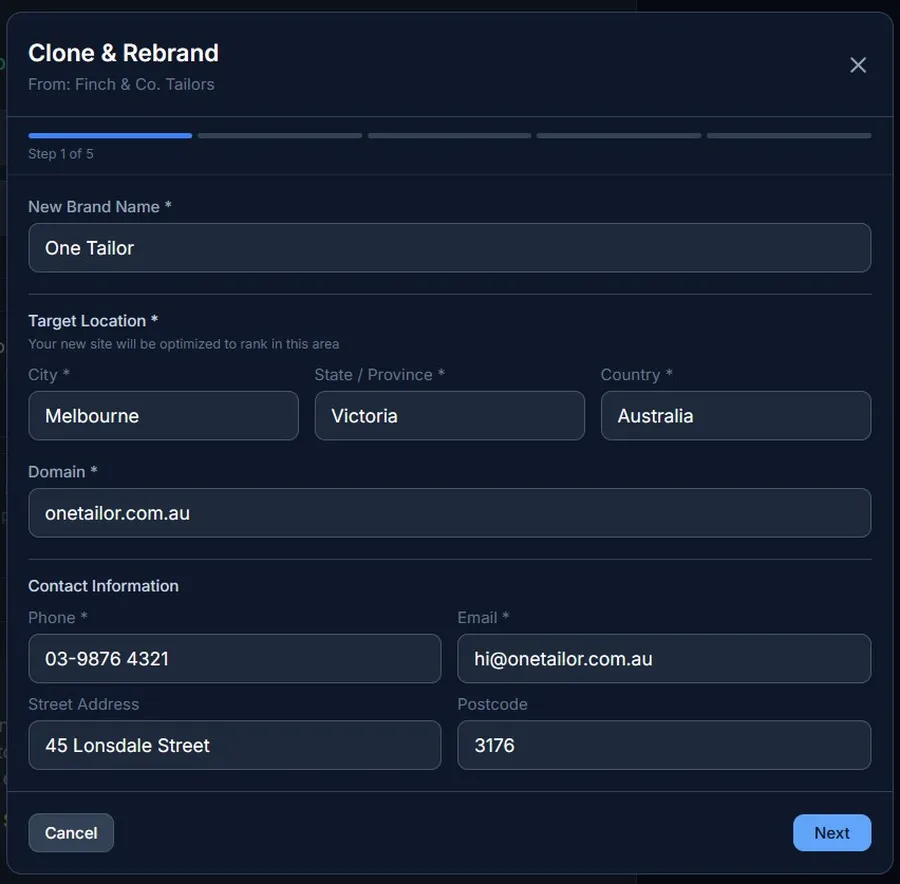
Brand & Location
Enter the new brand identity and where it will operate.
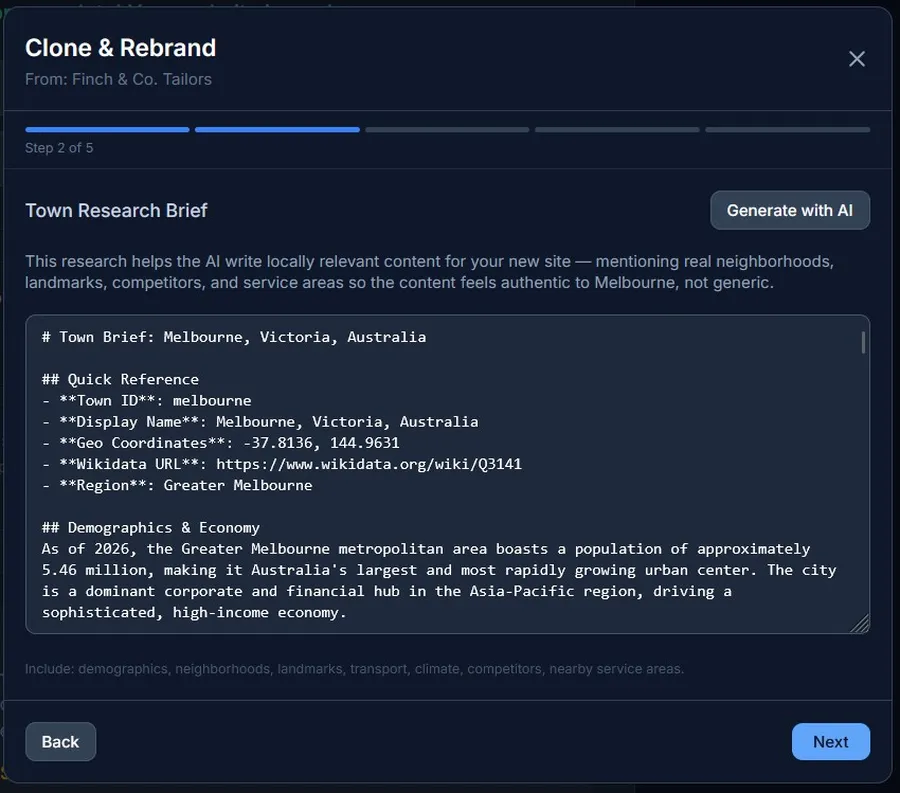
Town Research Brief
Click “Generate with AI” to auto-research the target area. The AI uses Google Search to find real data about the city: demographics, major employers, neighborhoods, climate, local competitors in your niche, construction activity, and regulatory requirements.
Review the brief and edit as needed. This is the foundation for all localized content. The more accurate and detailed the brief, the more authentic the generated content will sound.
Tip: Add specific details the AI might miss: a new housing development, a major employer that just opened, or a local regulation that affects your industry. These details make the content feel like it was written by someone who lives there.
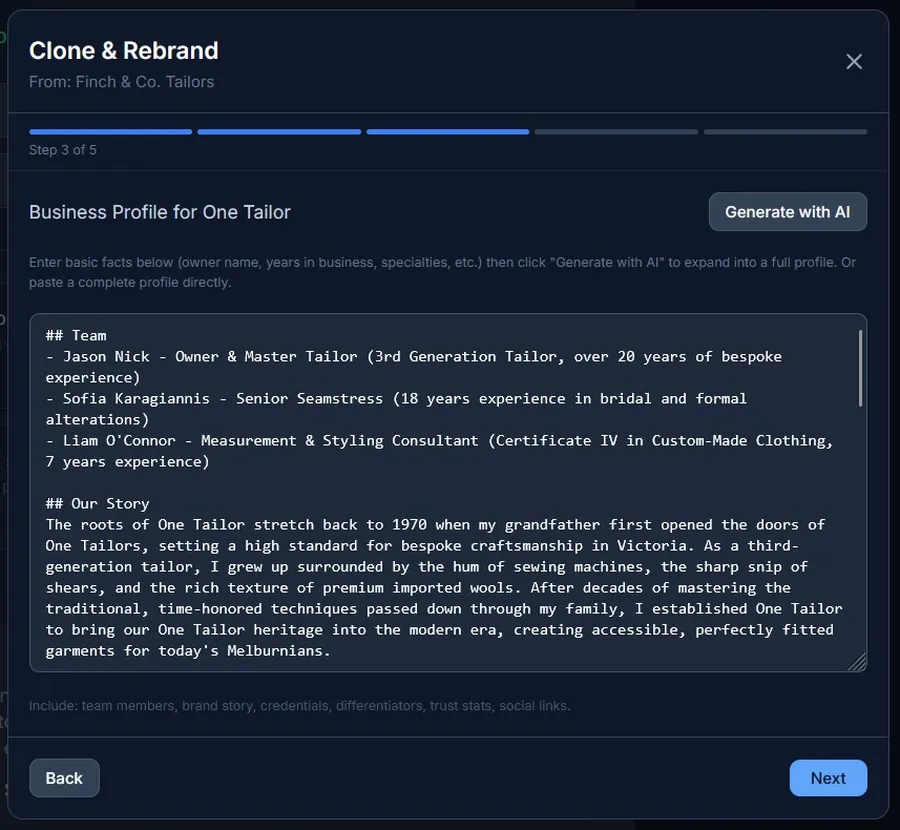
Business Profile
Define who this new brand is. The business profile includes the team, founding story, differentiators, credentials, and trust statistics. This information appears throughout the site: about page, homepage, schema markup, and testimonials.
Two ways to create a profile:
The profile includes:
- ✓ Team — 2-4 key people with names, roles, and credentials
- ✓ Our Story — Founding story with local connection
- ✓ What Sets Us Apart — 3-5 specific differentiators
- ✓ Credentials — Licenses, certifications, recognitions
- ✓ Numbers — Jobs completed, years in business, team size, rating
Options
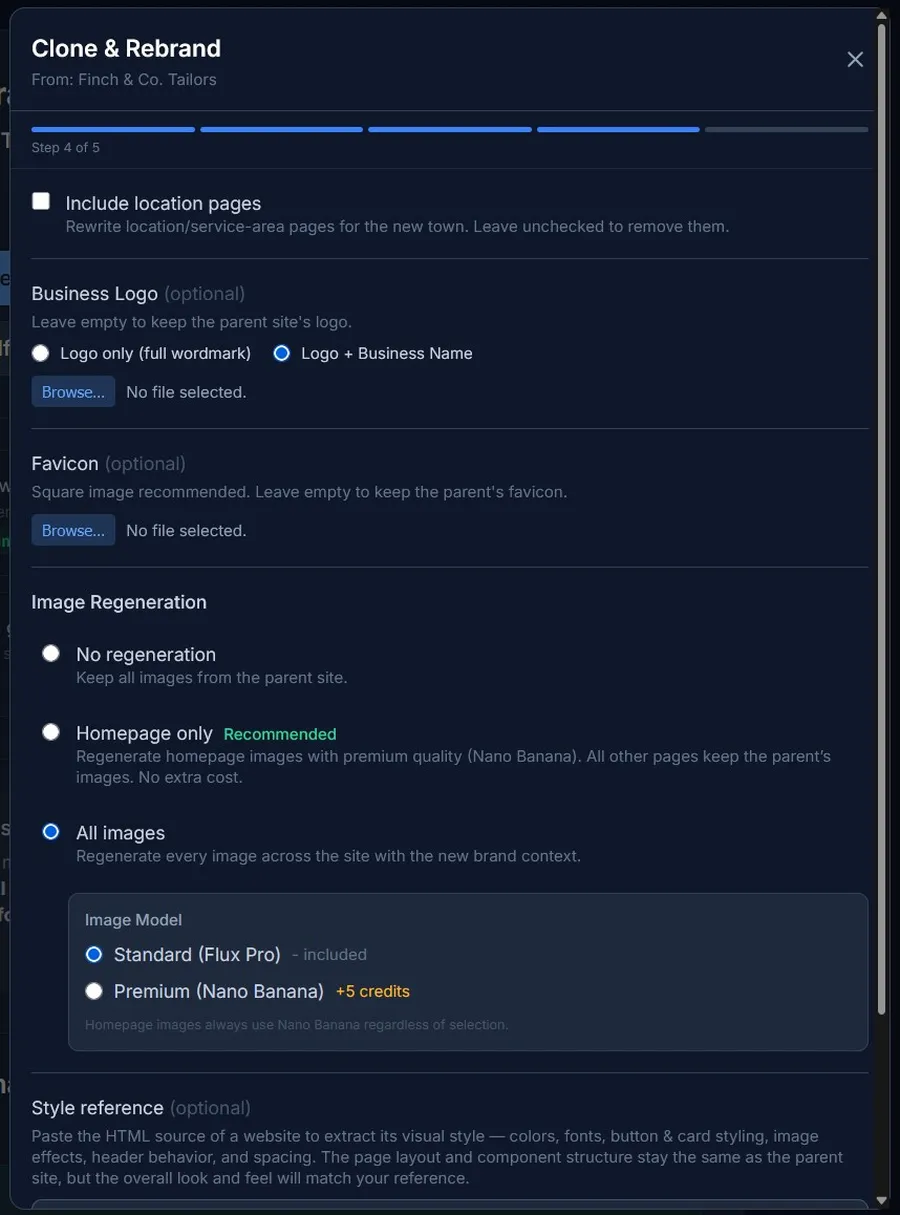
Configure optional settings for the rebrand.
Location Pages
Include or exclude location/service-area pages. When included, the system automatically detects whether the rebrand targets the same city or a different one:
- • Same city — Neighborhood data (areas, landmarks, transport, coordinates) is preserved from the parent. All text content is fully rewritten with the new brand voice and unique angles.
- • Different city — The AI researches real neighborhoods in the new city and generates location pages from scratch with accurate local data, landmarks, and transport info.
Image Regeneration
Three options for handling images in the rebranded site:
- • No regeneration — keep all parent images as-is
- • Homepage only (recommended) — regenerate homepage images with premium quality (Nano Banana), keep all other pages’ images from parent. No extra cost.
- • All images — regenerate every image across the site. Choose Standard (Flux Pro, included) or Premium (Nano Banana, +7 credits)
Visual Style Reference (sample.html)
Optionally paste the HTML source of a website to extract its visual style — colors, fonts, button & card styling, image effects, header behavior, and spacing. The page layout and component structure stay the same as the parent site.
Want a completely different layout? Create a new project instead of a rebrand.
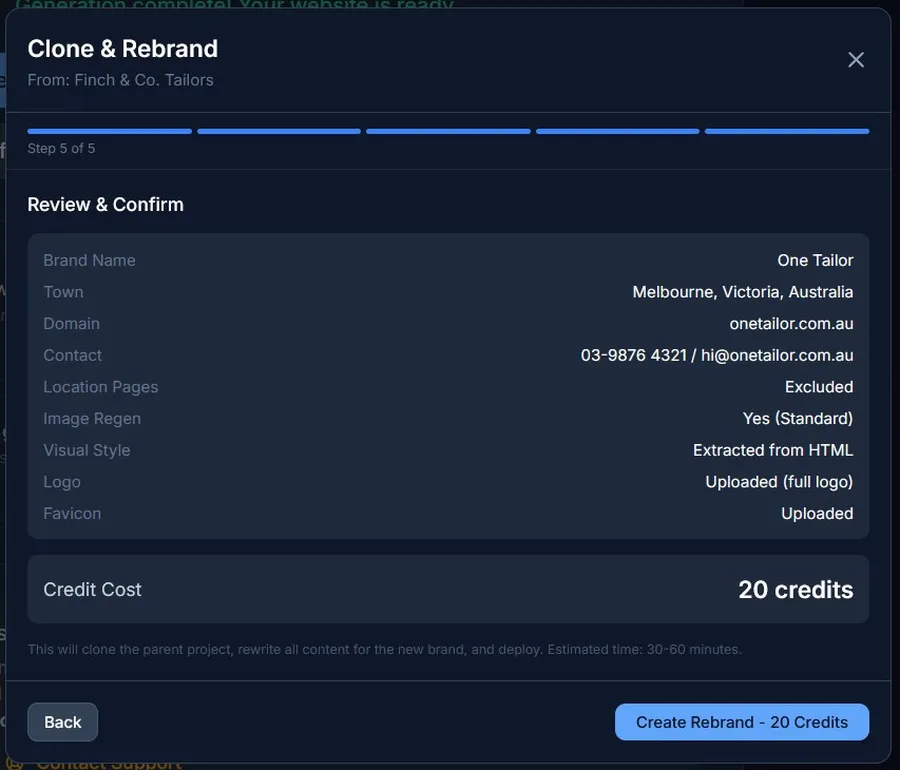
Confirm & Launch
Review the summary of all settings. The credit cost is displayed clearly. Click “Create Rebrand” to launch. Credits are deducted immediately and the system begins processing in the background.
You’re redirected to the status page where you can track progress. The rebrand typically takes 30-60 minutes. You’ll receive an email notification when it’s ready.
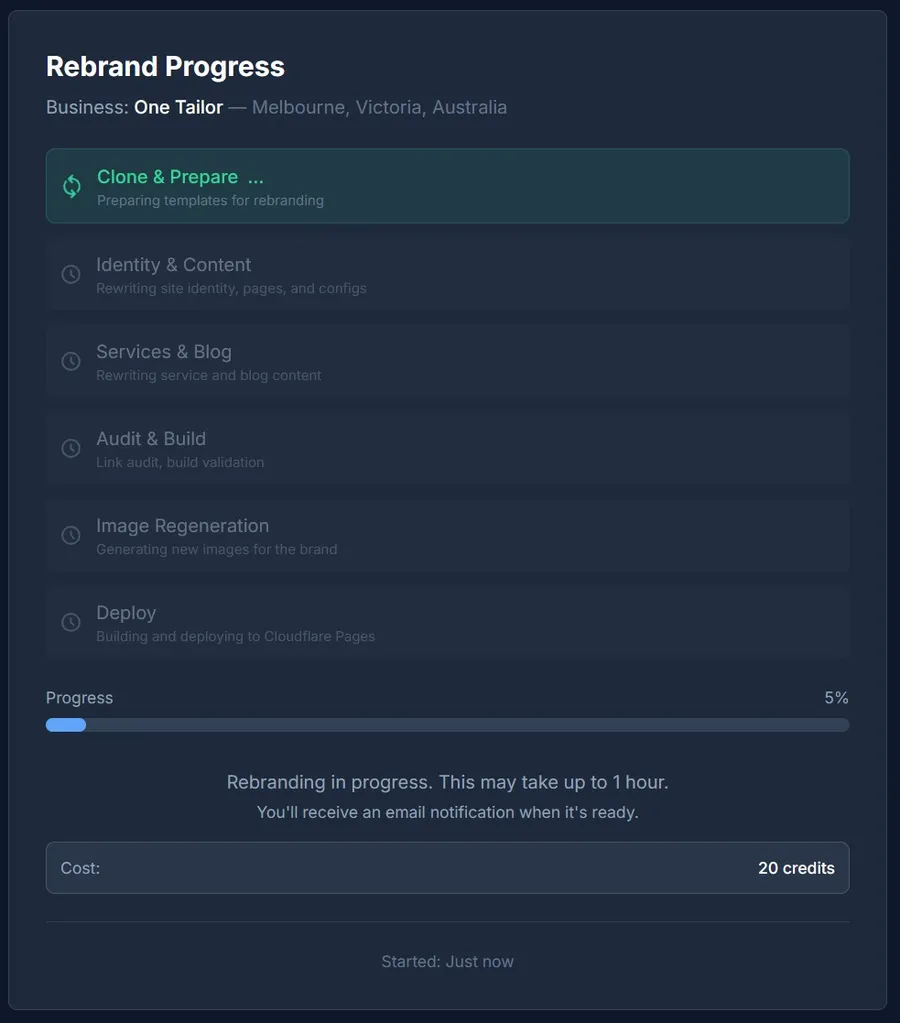
5What Happens Behind the Scenes
- ✓ Parent repository is cloned to a new, independent repo
- ✓ Rebrand workflow files and AI prompts are injected
- ✓ Site identity is rewritten: name, logo, contact info, schema markup
- ✓ Every service page is fully rewritten with new brand + local context (800+ words each)
- ✓ Every blog post is regenerated with local references and the new brand voice
- ✓ Homepage, about page, FAQs, and testimonials are completely rewritten
- ✓ Location pages are intelligently handled: same-city rebrands preserve neighborhood data; different-city rebrands research new neighborhoods via AI
- ✓ Currency, measurement units, and date formats are localized for the target country
- ✓ Link audit ensures all internal links work correctly
- ✓ Site is built and deployed to its own Cloudflare Pages project
Rebrand Progress Phases
6After Deployment
A rebranded site is a full standalone project. Everything you can do with a site created from scratch, you can do with a rebranded site.
AI Site Agent
Modify layout, content, structure, and design conversationally. Full access, just like any project.
Quick Editors
Edit content, images, blog posts, services, and theme directly in the browser.
Deep Optimize
Run additional SEO enhancement passes to further improve rankings.
Custom Domain
Connect your brand domain with one click. Free SSL via Cloudflare.
Download
Download the compiled website as a ZIP or the full Astro source code.
Publish to Cloudflare
Deploy updates and manage hosting directly from the dashboard.
The rebranded site is fully independent. Changes to the parent project don’t affect the rebrand, and vice versa. You can even create satellite sites from the rebranded project to expand the new brand into more cities.
Need to swap the logo, hero image, or any other asset? You can drop files directly into the AI Site Agent chat — drag, paste, or click the paperclip — and ask it to replace the asset for you. See Attachments for details.
7Cross-Country Rebranding Tips
When rebranding to a different country, the system automatically handles localization. Here are some tips to get the best results.
Currency & Pricing
Currency symbols and codes are automatically updated based on the target country. Price ranges in service pages are adjusted to use the correct currency.
Measurement Units
Metric vs imperial units are adjusted in content. An Australian site uses metres and Celsius; a US rebrand uses feet and Fahrenheit.
Regulatory References
Licenses, certifications, and compliance references are localized. Provide country-specific credentials in the business profile for best accuracy.
Phone Number Formats
Enter the phone number in the target country’s format. The system uses it as-is throughout the site and schema markup.
Language
The rebranded site matches the language of the parent project. If the parent is in English, the rebrand will also be in English. Multi-language rebranding is not currently supported.
Frequently Asked Questions
Can I rebrand to a different industry?
No. The site structure and services come from the parent project. Clone & Rebrand changes the brand, location, and content but keeps the same service structure. If you need a completely different industry, create a new project from scratch.
How many rebrands can I create from one parent?
Unlimited. Each rebrand is an independent project with its own repository, hosting, and domain. The parent project is never modified.
Can I edit the rebranded site after deployment?
Yes. A rebranded site is a full project. You have access to Quick Editors, AI Site Agent, Deep Optimize, source code download, and everything else available to a standard project.
Can I rebrand to the same city?
Yes. This is useful for competing against yourself under a different brand, or for targeting a different market segment (premium vs budget) in the same area. If you include location pages, the system detects it’s the same city and preserves the existing neighborhood data while fully rewriting all text content for the new brand.
Will Google penalize me for having two similar sites?
No. The content is fully rewritten, the brand identity is completely different, and there are no cross-links between the sites. Google sees them as separate businesses. Each site has its own schema markup, domain, and hosting.
Can I create satellite sites from a rebranded project?
Yes. A rebranded site is a full project. You can create satellite sites from it to expand the new brand into more cities at 10 credits per satellite.
What if I don’t provide a business profile?
The business profile is required. It defines the team, story, and credentials that appear throughout the site. You can enter a few basic facts (team size, years in business, specialties) and click “Generate with AI” to expand them into a complete profile.
Can I customize the design of the rebranded site?
Yes. Paste a sample.html in the Options step to extract the visual style from a reference website — colors, fonts, button & card styling, image effects, header behavior, and spacing are all applied. The page layout and component structure stay the same as the parent. If you need a completely different layout, create a brand-new project instead.
Just need to expand to more cities?
If you want to rank the same brand in more cities without changing the business identity, use Satellite Sites instead. They’re faster (15-30 minutes), cheaper (10 credits), and keep your existing brand, team, and credentials intact.
Ready to Launch a New Brand?
20-27 credits. Fully independent website with new identity, localized content, and SEO. Deployed in under an hour.
No monthly fees. No per-site subscription. Build once, it’s yours.
Go to Dashboard