Lead Capture - Send Contact Form Submissions Straight to Your Inbox
Every contact form on every site you connect posts to LocusPilot, then forwards the lead to the email you choose. No third-party form service. No silent drop-offs when formsubmit.co or a similar relay goes down.
leads.locuspilot.com, so submissions land in the project's contact email out of the box. You do not need to run Set up lead capture on a freshly generated site.Two things you might still do by hand. Enrol a site under Portfolio › Sites if you have an Operator subscription or above: that turns on the Leads Inbox, click tracking, the Portfolio dashboard, and the site starts counting toward your plan's site limit. Run Set up lead capture only on older sites generated before the forms-to-email switch, or any site that still uses a third-party form relay you want to retire.
1Three States a Site Can Be In
Pick the row that matches the project. Most new sites start in row 1, and subscribers move the ones they care about into row 3.
New site, default
Automatic. No action needed.
- ✓Forms already post to LocusPilot
- ✓Emails go to the project contact email
- ✕No Leads Inbox
- ✕No click tracking dashboards
- ✕No Portfolio
PAYG cap: 50 submissions per project per day.
Older site, patched
Run Set up lead capture once.
- ✓Replaces formsubmit.co (or similar) with LocusPilot
- ✓Emails go to the project contact email
- ✕No Leads Inbox
- ✕No click tracking dashboards
- ✕No Portfolio
Same outcome as a new site. One-time fix for older repos.
Enrolled
SubSubscriber enrols it manually.
- ✓HTML email to your inbox
- ✓Leads Inbox with search and history
- ✓Click tracking dashboards
- ✓Portfolio rollup across all enrolled sites
Uses one slot on your plan (3 / 10 / 30 / 100).
Enrolment is always a manual step. We do not auto-enrol new sites because most operators only want a subset of their projects rolled up in the Portfolio.
2Enrol a Site (Subscribers)
Enrolment is what turns on the Leads Inbox, click tracking, and the Portfolio for a project. It is always a manual step, even for brand new sites - we do not auto-enrol on generation, because most operators only want a subset of their projects rolled up.
Open Portfolio › Sites from the dashboard sidebar. You will see the list of sites already enrolled and how many slots are left on your plan.
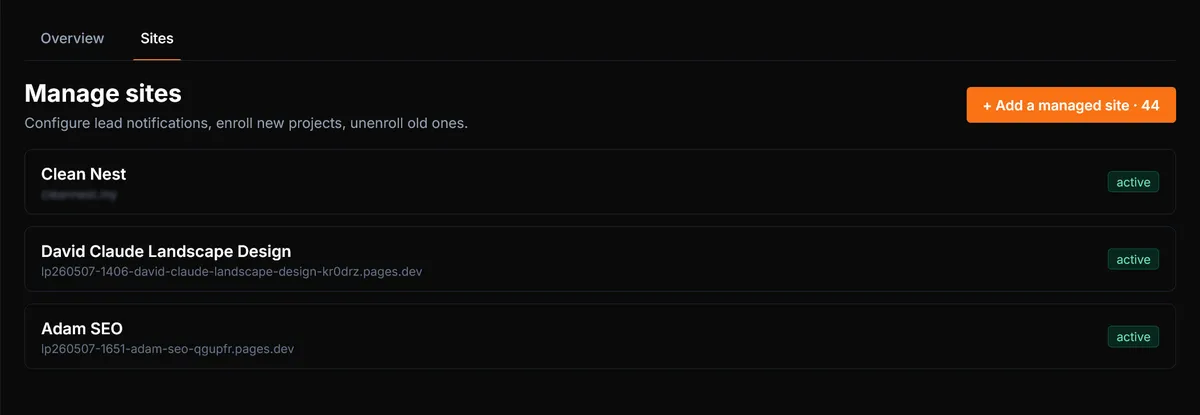
Click Add a managed site, pick a project from the dropdown, and confirm. The site goes into Pending while we rewrite the form actions and redeploy.
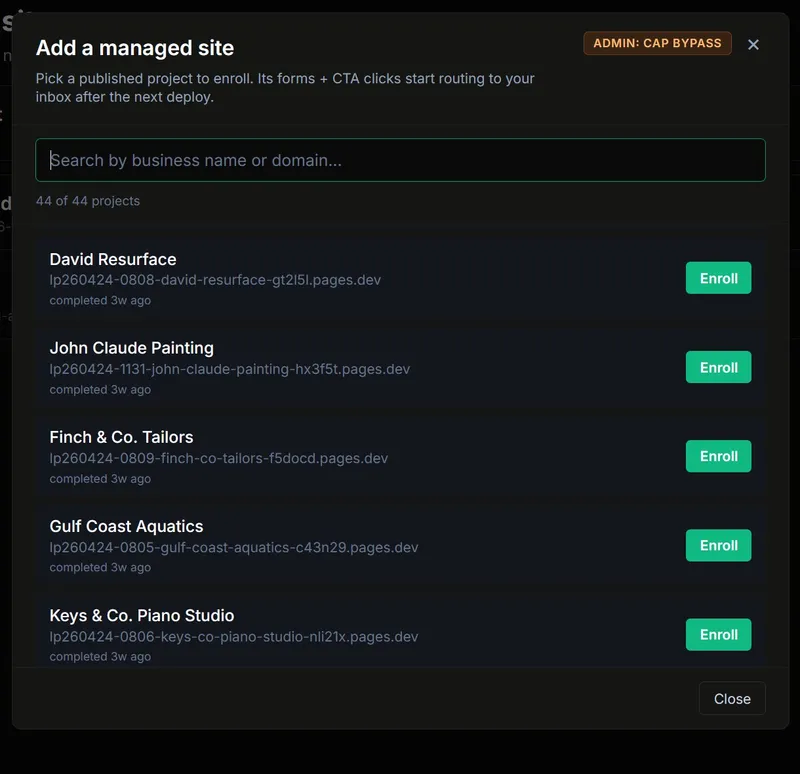
Pending takes about 4-5 minutes. The page polls automatically and flips to Active once the redeploy lands. You can leave the page and come back; nothing breaks.
3Set Up Lead Capture (Older Sites Only)
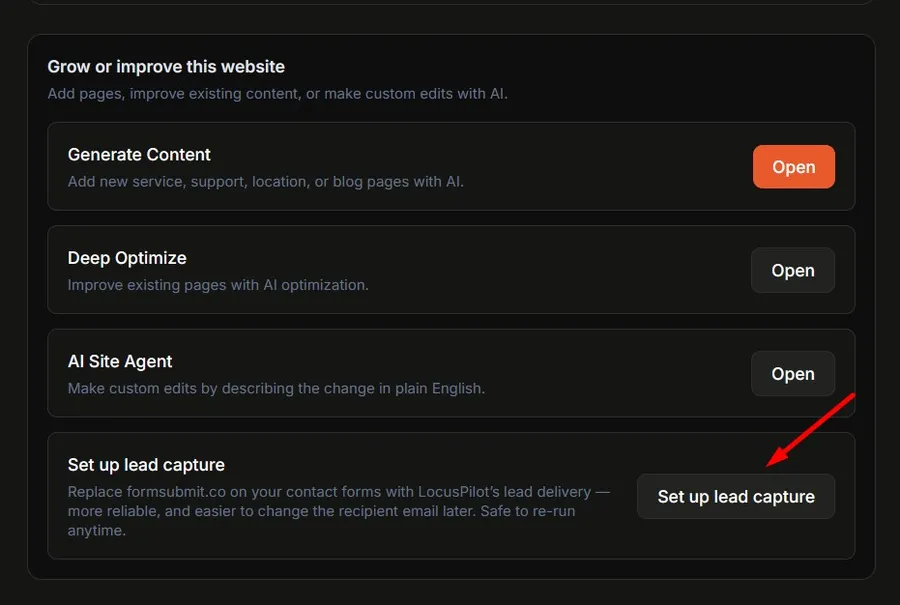
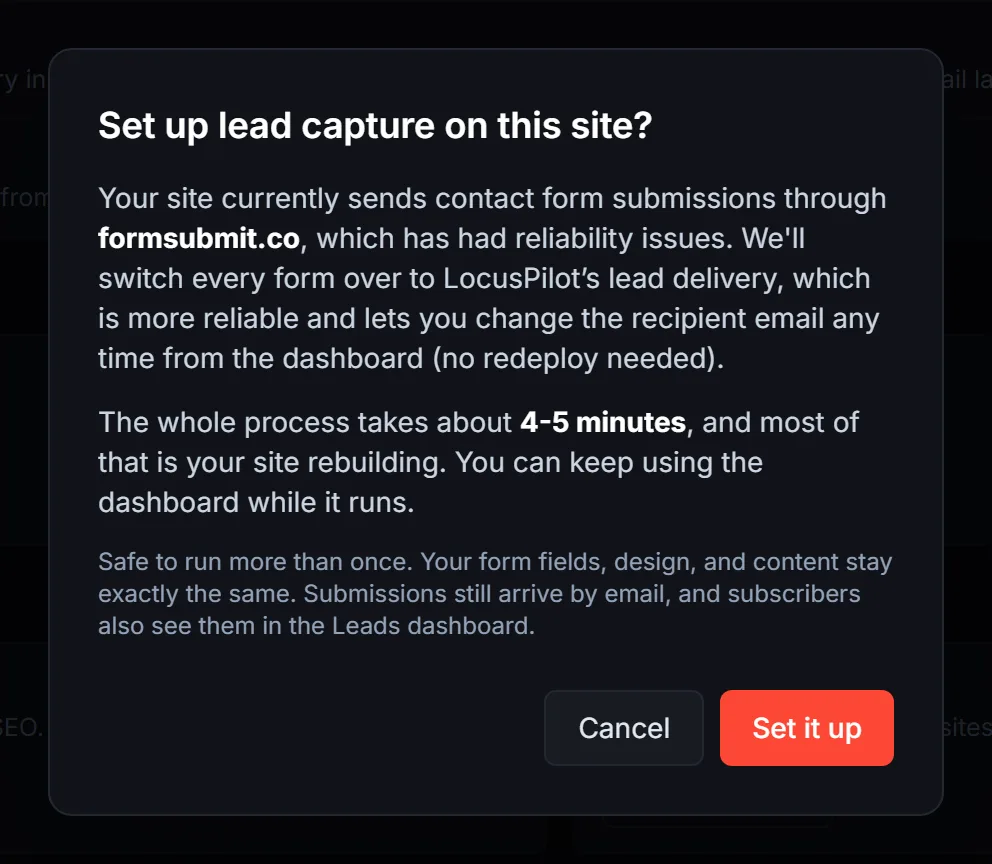
Sites generated before the forms-to-email switch still point at formsubmit.co (or whatever relay the original template used). Set up lead capture is the one-click retrofit: open the project status page, click the button, and we rewrite the form actions to point at LocusPilot and redeploy.
When to run it
- •A site you generated months ago is still using formsubmit.co or a similar third-party relay.
- •You imported or hand-edited a contact form and the action URL got out of sync.
- •The project's contact email was updated and you want the lead worker to pick up the new value.
Either way, this only fixes the email-delivery side. It does not turn on the Leads Inbox, click tracking, or the Portfolio. Those need a subscription and an enrolment (Section 2).
4Where Your Leads Land
Two different stories depending on which path you took.
Enrolled sites (Subscription)
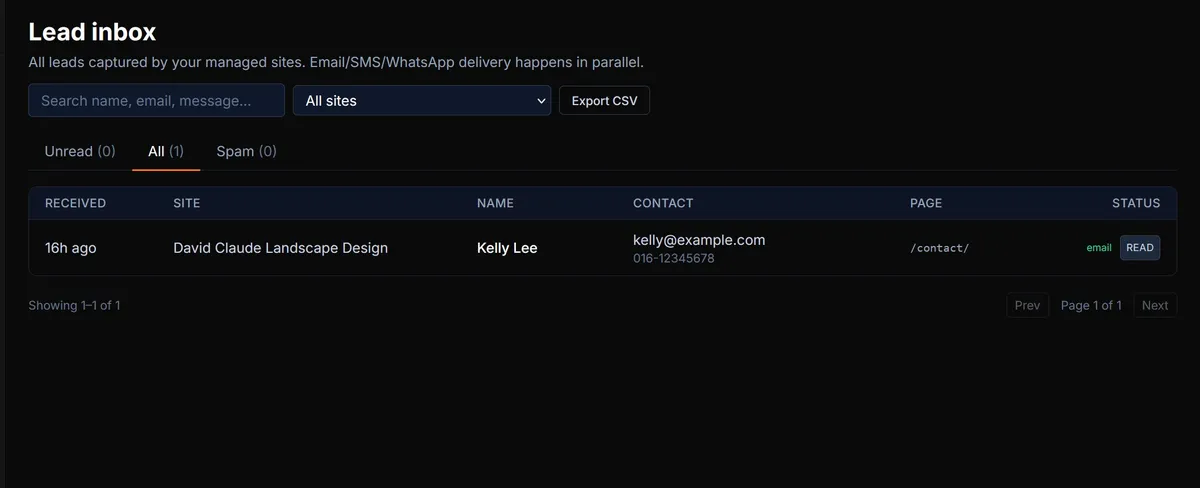
SubscriptionEvery submission becomes both an email to your inbox and a row in the LocusPilot Leads Inbox. The Inbox is your searchable record, even when you delete the email.
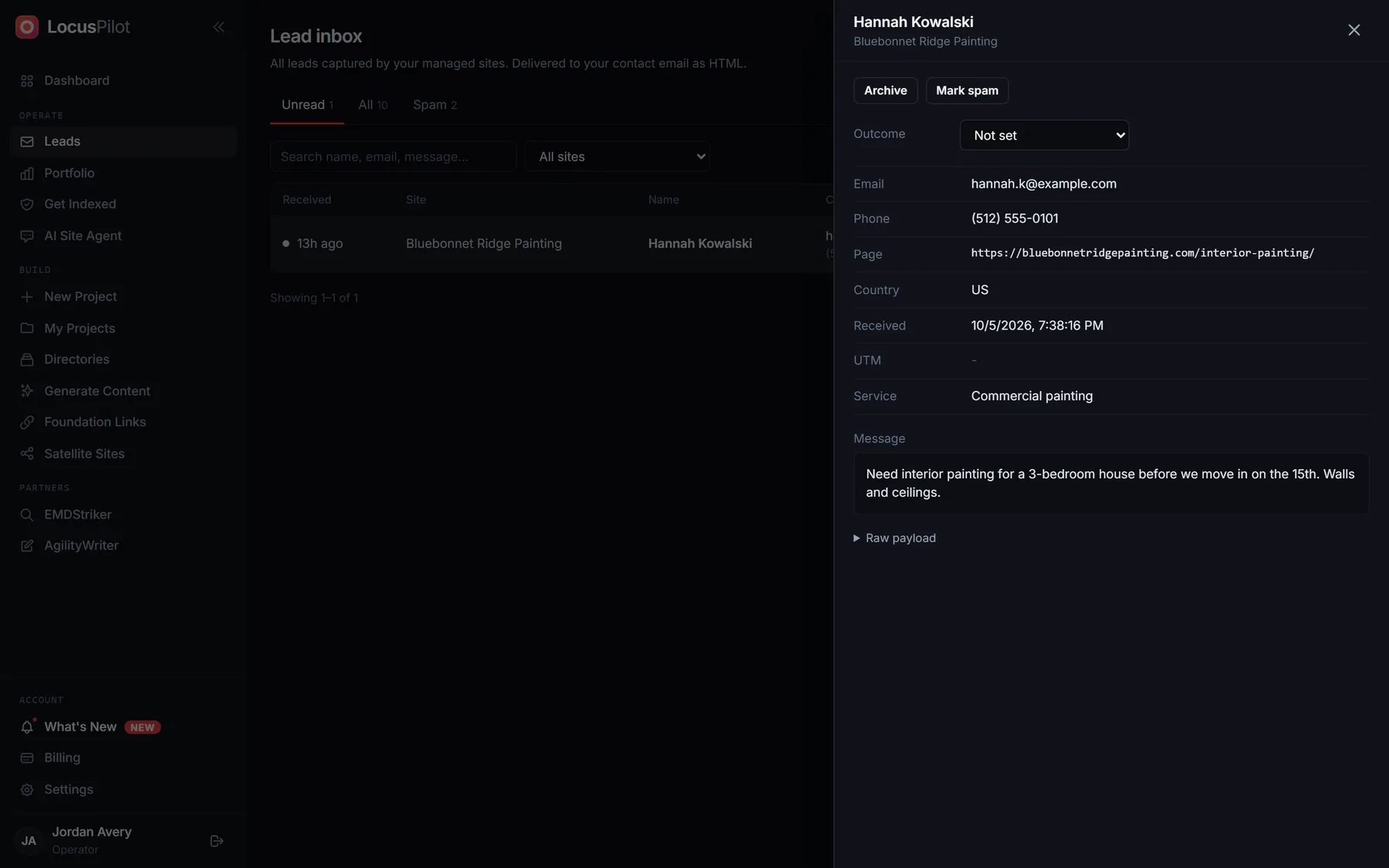
Click a lead to open it. The drawer shows every field, the page it came from, and an Outcome you can set as the job moves along.
Set up lead capture (PAYG / Free)
PAYG / FreeEach submission is sent as an HTML email to the project's contact email. That is the entire story: no Leads Inbox UI, no row history, no in-product search. Treat the email as the record.
What we capture (both paths)
Every form field, automatically. Name, email, phone, message, plus any custom field (service, budget, dropdown answers). We do not need to know your field names in advance.
Where it came from
The page URL of the submission, the traffic source (organic, paid, social, referral), and the visitor's approximate city. All included in the email body.
Delivery channels by path
| Path | Leads Inbox | Daily cap | |
|---|---|---|---|
| Default / Set up lead capture | HTML email | No | 50 / project / day |
| Enrolled under Portfolio › Sites | HTML email | Yes | No cap |
SMS and WhatsApp delivery are on the roadmap. Email is the only channel today.
The 50/day cap on PAYG protects shared infrastructure from runaway forms. If one project pulls more than 50 leads in a day, that is your signal to enrol it.
5Set the Contact Email
We pick the recipient automatically, in this order:
- 1Repo first. Whatever email lives in
src/config/site.jsonundercontact.email. This is the same email shown on your contact page, so leads always go to the same address visitors see. - 2Factsheet next. If the JSON is missing or malformed, we read
.data/business-factsheet.txtand grab the first email-shaped string. - 3Account email as backup. If neither source has an email, we fall back to the email on your LocusPilot account so leads are never dropped.
Want to change it? Open the project, go to Edit Website → Settings, and update the contact email there. The change writes back to both the repo (so your live site shows the new email) and to LocusPilot (so leads route to it). One field, both ends in sync.

6Plan Limits
How many sites you can enrol depends on your subscription tier:
Unenrol a site any time to free up a slot. Unenrolling reverses the rewrite on the next deploy, so the site goes back to its original form behaviour. We do not auto-archive sites when you unpublish or when a domain expires; you stay in control.
7Custom Hosting Works Too
Lead capture does not require Cloudflare Pages. The form posts to leads.locuspilot.com directly, so the host of the site does not matter. We have tested this on:
The page on the visitor's screen is yours, wherever it lives. We only intercept the form post.
Frequently Asked Questions
Do new sites need Set up lead capture?
No. Sites generated by LocusPilot today already have their contact forms pointing at leads.locuspilot.com, so submissions go to the project contact email out of the box. Run Set up lead capture only on older sites that still use formsubmit.co or a similar third-party relay. On a new site, the button is a safe no-op (it will say "no files changed").
Can I use lead capture without subscribing?
Yes. Every site you generate already delivers form submissions by email out of the box; you do not have to do anything. You only need an Operator subscription if you want the in-product Leads Inbox, click tracking dashboards, or the Portfolio. PAYG projects are capped at 50 submissions per project per day.
Are new sites enrolled automatically?
No. Form delivery to email is automatic on new sites, but enrolment is always a manual step. Open Portfolio › Sites, click Add a managed site, and click Enroll next to the project. We do this on purpose: most operators only want a subset of their projects rolled up in the Portfolio, and enrolment uses a slot on your plan.
What happens to my enrolled sites if I cancel?
Your subscription stays active until the end of the current billing period. You keep the Leads Inbox, click tracking, and Portfolio that whole time.
At the period end, every enrolled site flips to archived. We do not touch your repo and we do not break your forms - submissions continue to land in the same contact email they were going to before, using the recipient address we cached at enrolment. You just lose the in-product views (Leads Inbox, click tracking, Portfolio).
You have 30 days after cancellation to export your full lead history as CSV from the Leads Inbox. After 30 days the export is locked but the rows stay in the database (we never delete leads).
When you re-subscribe, all your previously enrolled sites are still listed under Portfolio › Sites (in archived state). Pick which ones to bring back, up to the new plan's site limit: click Add a managed site and Enroll each one again. The existing form actions still resolve, so no redeploy is needed. The rest stay archived but keep emailing.
Can I downgrade my plan directly?
No - the path is always cancel first, then re-subscribe to the smaller plan. This is on purpose: it forces you to pick which sites to bring back when moving from a larger plan to a smaller one, instead of us silently turning seven of your forms into uncovered ones. See the cancel-behaviour FAQ above for what happens to your sites during the transition.
I enrolled a site but I am not receiving emails
First, check the status under Portfolio › Sites. If it says Pending for more than 10 minutes, the redeploy is stuck. Click into the project and look at the latest deployment log. If status is Active, check spam, then verify the contact email under Edit Website → Settings. Leads always land in the Leads Inbox first, even if email delivery is slow, so that page is the source of truth.
The email shows the wrong source page
Source page comes from the URL where the form was submitted, not the destination of the form post. If you patched a site before mid-May 2026, run Set up lead capture again to pick up the latest tracker. Newly enrolled sites get this automatically.
My form still goes to formsubmit.co
The rewriter only triggers on enrolment or a Set up lead capture click. Make sure the site shows active under Portfolio › Sites. If the form action in the live HTML still points at formsubmit.co, contact support with the project ID and we will look at the deployment log.
Can leads go to more than one email?
Not yet. Today every site has one recipient. If you want a team inbox, point the contact email at a Google Group or a forwarding alias. Multi-recipient delivery is on the roadmap.
What about spam?
We honour the standard honeypot fields (_honey, website) and tag obvious spam as such in the Leads Inbox. Hard-spam volume is small in practice because the form post requires JavaScript on a real page.
Can I see leads from before I enrolled?
No. Lead capture starts from the moment the site flips to Active. Submissions to the old form service stay with that service.
Related Guides
Ready to Enrol Your First Site?
Open Portfolio › Sites, add a managed site, and you will be live in about 5 minutes.
Add a managed site