Connect Claude to your LocusPilot account
Ask Claude about your leads, sites and directory listings in plain English. Make a key, add it to Claude once, and you are set.
You can ask Claude about your LocusPilot account in plain English. "Which leads came in this week that I haven't opened?" "Which of my sites lost calls compared with last month?" "Which listings got the most calls in my aircon directory but aren't featured?"
It works through MCP, the standard Claude and other AI apps use to connect to outside tools. You make an API key in your LocusPilot dashboard, add it to Claude once, and Claude can read what that key allows. It takes about five minutes.
What you need
- An active LocusPilot subscription (Operator or higher). Pay-as-you-go accounts can't connect.
- The Claude app (claude.ai in the browser, or Claude Desktop), Claude Code, ChatGPT, or another MCP app that lets you add a server URL.
Step 1: make a key
- In LocusPilot, go to Settings > API Keys and click Generate New Key.
- Name it after the app you'll use, for example "Claude Desktop" or "Claude Code on my laptop". You'll want to know which key is which if you ever need to revoke one.
- Pick what the app can do. Read only is the safe start. Read and triage also lets Claude mark leads and log outreach.
- Leave "Change lead routing" unticked unless you swap renters through Claude. If a key with it leaks, someone could send your leads to their own inbox.
- Copy the key. We show it once.
Step 2: add LocusPilot to the Claude app
These steps work the same on claude.ai and in Claude Desktop.
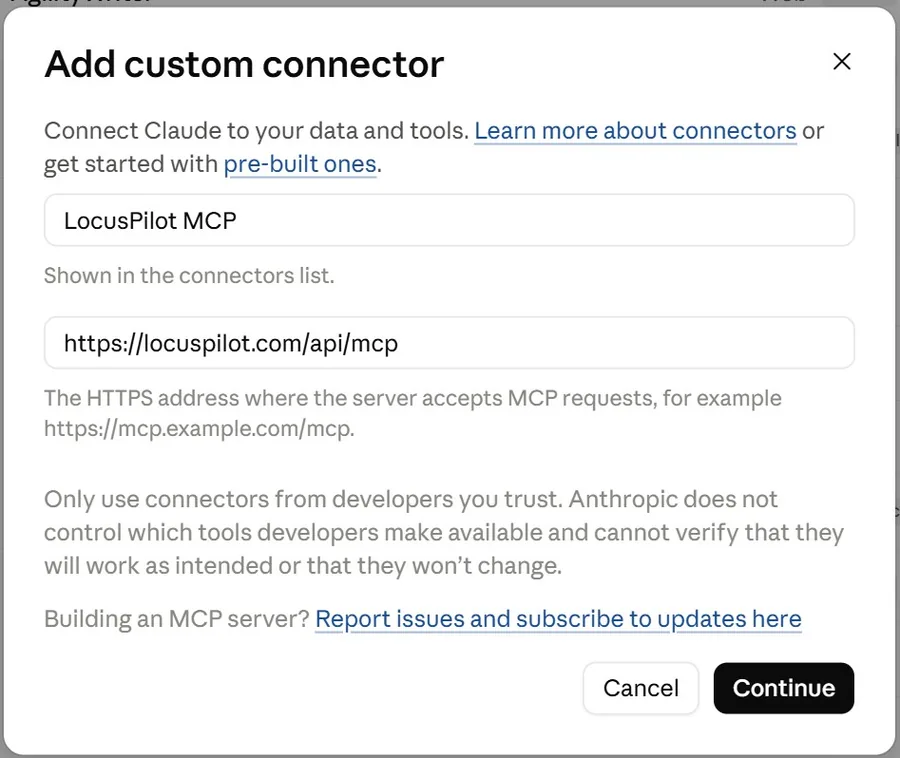
- In Claude, open Settings > Connectors and choose Add custom connector. Name it "LocusPilot MCP", paste
https://locuspilot.com/api/mcpas the address, and click Continue.
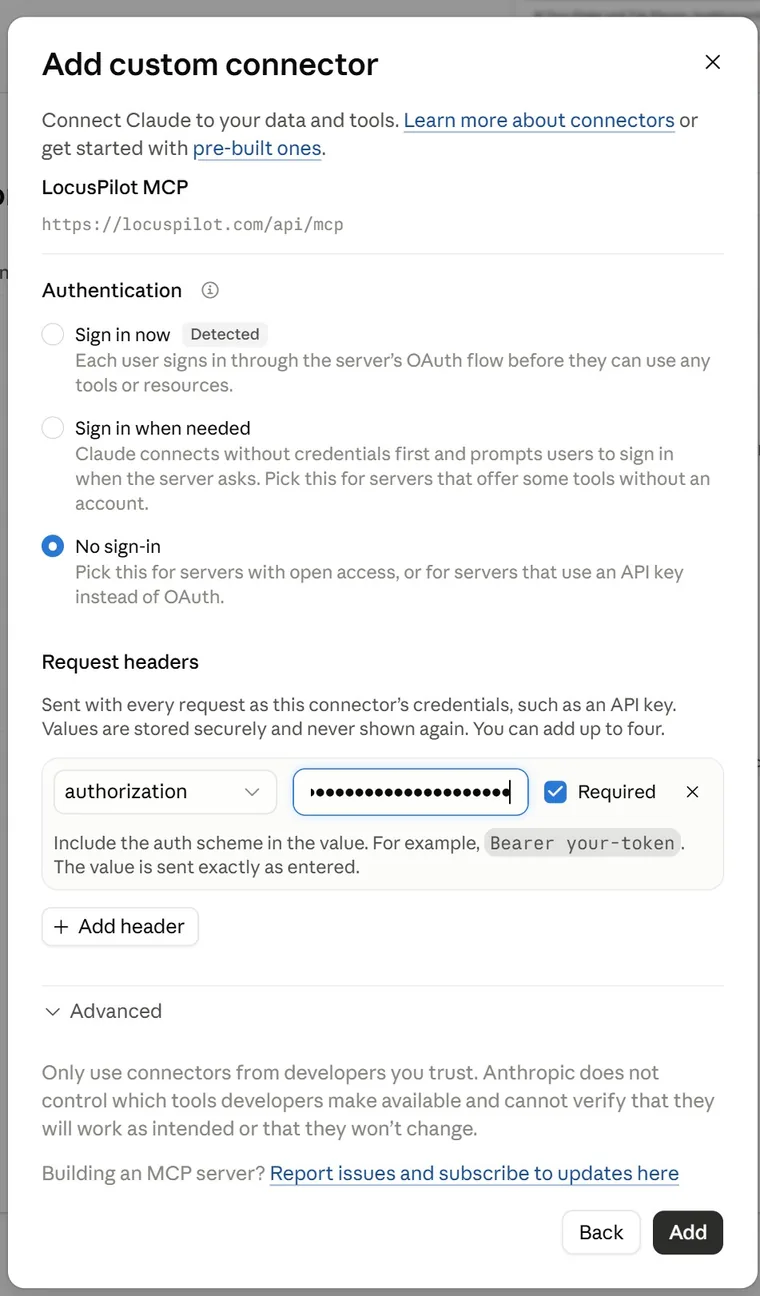
- Under Authentication, pick No sign-in. Claude marks "Sign in now" as detected, but LocusPilot uses an API key, not a sign-in, so that option won't work.
- Under Request headers, click Add header. Choose
authorizationas the name, and for the value typeBearer, a space, then your key (Bearer lp_...). Leave Required ticked and click Add.
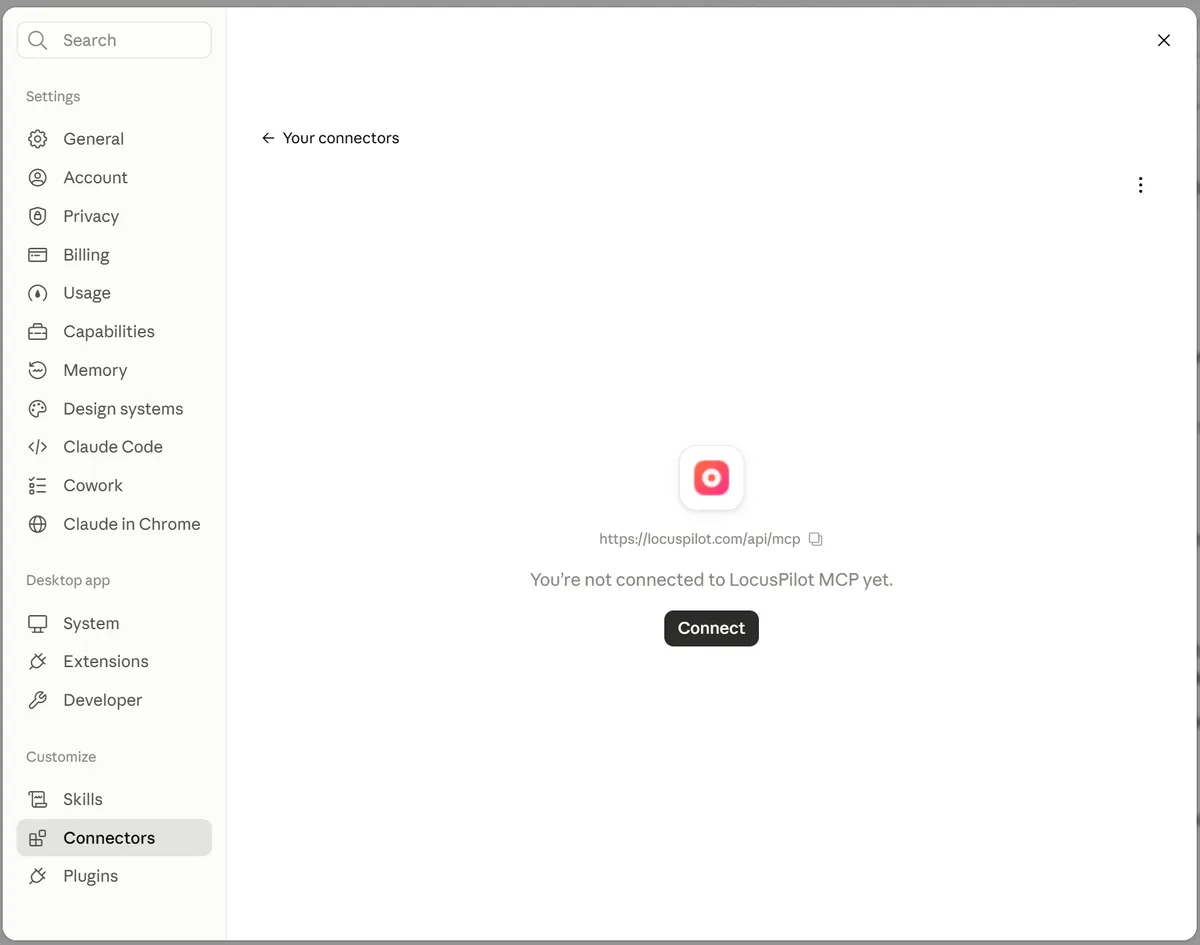
- On the connector page, click Connect.
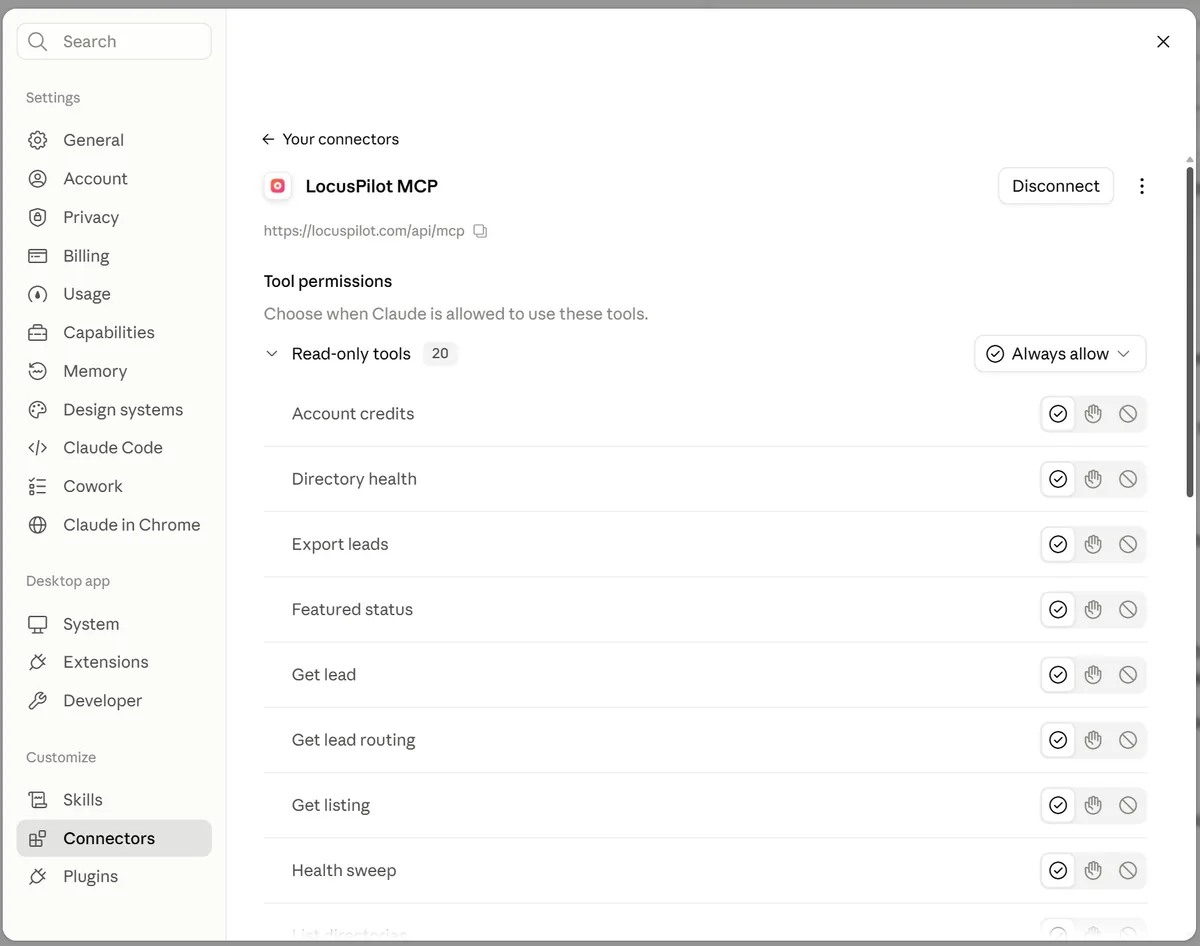
- Pick when Claude may use each tool. Read-only tools are safe to set to Always allow. For tools that change something (updating leads, logging outreach, changing lead routing), you may prefer Claude to ask you first. The list only shows the tools your key's access options allow.
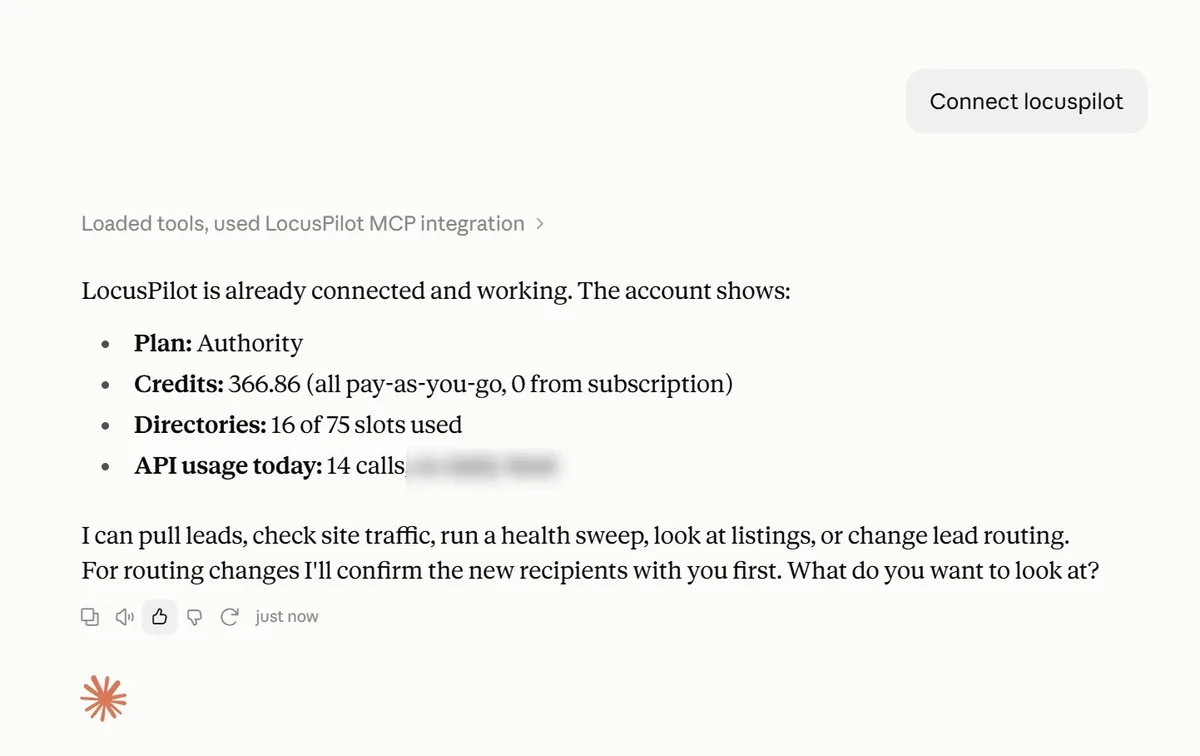
- Start a new chat and ask Claude to check your LocusPilot account. It should reply with your plan, credit balance and directory slots.
Or connect Claude Code
The key screen in LocusPilot gives you a command with your key already in it. Paste it into your terminal:
claude mcp add --transport http locuspilot https://locuspilot.com/api/mcp --header "Authorization: Bearer YOUR_KEY"
Then open Claude Code and type /mcp. You should see locuspilot in the list.
Or connect ChatGPT
ChatGPT's MCP apps can't send a key in a header, so the key goes in the address instead: https://locuspilot.com/api/mcp?api_key=YOUR_KEY, with Authentication set to No authentication. Make a separate key named "ChatGPT" for this. Step-by-step with screenshots: connect ChatGPT guide.
Anyone who sees that full address can use the key, so don't paste it into chats, tickets or screenshots. If it ever leaks, revoke the key in LocusPilot and make a new one. For the same reason, a key sent this way can't change lead routing, even if you ticked that option. Everything else works as usual.
Other apps: the server URL is https://locuspilot.com/api/mcp and the header is Authorization: Bearer YOUR_KEY. If an app can't send headers, use the ChatGPT form of the address.
What each access option allows
| Option | What Claude can do |
|---|---|
| Read leads | Search your inbox, open a lead with its message, export leads |
| Update leads | Mark leads read, archived or spam, and record won or lost |
| Read site stats | Calls, WhatsApp taps and leads per site, top pages, cities and sources, lead routing settings |
| Read directories | Listings, calls per listing, featured slots, Opportunities lists, business emails, your outreach log |
| Log outreach | Record a pitch, a reply, a win, or a business asking you to stop |
| Change lead routing | Change who gets a site's lead notifications, one site at a time. We email you each time it happens |
Things to try
- "List this week's new leads across all my sites and tell me which ones look like spam."
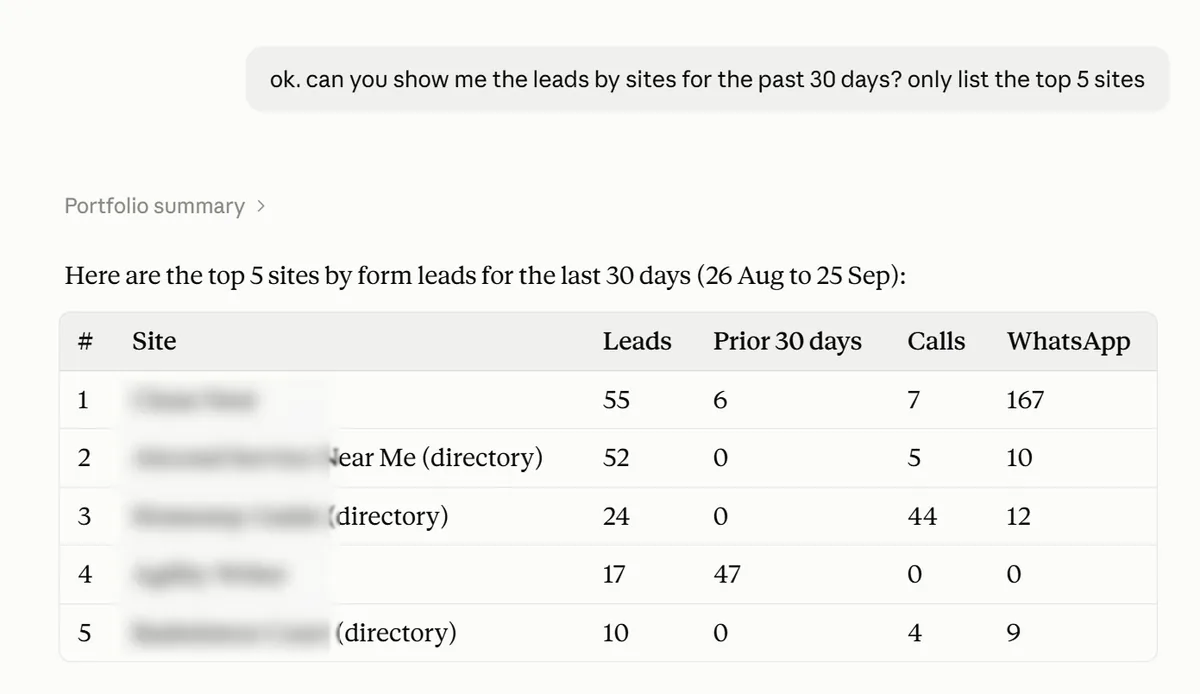
- "Which sites dropped more than 40% in calls compared with the previous 30 days?"
- "In my aircon directory, which listings got the most calls and WhatsApp taps in the last 30 days and aren't featured?"
- "Whose featured slot ends in the next 14 days? Give me their numbers for the renewal email."
- "What changed in my directory since the last refresh?"
- "Businesses with no website and 50+ reviews, rated 4.5 or higher."
Here is a real portfolio question and Claude's answer (site names blurred):
Pitching listed businesses
LocusPilot never sends email or messages for you. Claude can write a pitch using a business's own numbers ("our directory sent you 34 calls last month"), and you send it from your own mailbox.
Ask Claude to log each draft as it goes. Then a later request like "draft pitches for the top 10 unfeatured listings by calls, skip anyone I contacted in the last 60 days" leaves out the businesses you already pitched, in any of your directories.
Business emails come from the listing's own website, when the site shows one. Businesses with no website, or only a social page, often have none.
When a business asks you to stop
Tell Claude ("mark Kedai Ah Seng as do not contact") or tick Do not contact on the listing in your dashboard. Either way the business is marked in every directory you own: its email is hidden from you and from any AI app you connect, and it drops out of your CSV exports and the prospect lists Claude pulls.
Claude can mark a business Do not contact but can't clear it. Only you can, from the dashboard.
Limits
Every tool is free: nothing here uses credits. Each key has a call limit per minute and per day, set by your plan:
| Plan | Calls per minute | Calls per day |
|---|---|---|
| Operator | 30 | 1,500 |
| Growth | 60 | 5,000 |
| Agency | 120 | 15,000 |
| Authority | 240 | 40,000 |
Listing searches are capped at 2,000 listing rows per directory per day, across all your keys. That is plenty for questions and pitch lists. For a full prospect list, use the CSV export on the Opportunities tab.
If you hit a limit, Claude gets the reset time and is asked to stop and tell you instead of retrying.
Your data and your AI provider
Anything a key can read, the app you connect can read too: lead names, emails, phone numbers and messages, and the business emails we find on listing websites. That data goes to your AI provider under their terms, not ours.
- Give each app its own key, and revoke a key the day you stop using it (Settings > API Keys > Revoke). It stops working on the next request.
- Recent actions, next to each key, lists the last 20 changes and lead exports that key made, so you can check what an app did.
- You are responsible for how you use contact details, including any email you send to a listed business.
Questions
Does it cost credits?
No. Tools are free and only count against your key's call limit.
Can Claude edit or publish my sites?
Not yet. This first version reads your data and handles triage: lead status, outreach notes and lead routing.
Can it send the pitch for me?
No. LocusPilot never sends email to businesses. Claude writes the draft, you send it.
Does it work with claude.ai in the browser?
Yes. Add it as a custom connector with the authorization header, as in Step 2.
Does it work with ChatGPT?
Yes, with the key in the address. See the connect ChatGPT guide. Lead routing changes are the one thing it can't do that way.
What happens if I cancel?
AI app access stops when your subscription ends. Entity Analysis keys keep their own rules.